In his article "Using Jira Data Center with AI Features," my colleague Nicolas Inden showed how to connect a self-hosted Jira instance with an AI model. One point stands out: Atlassian will support Jira Data Center only until early 2029. After that, support ends. Sales of Data Center licenses to new customers were even discontinued back in late March 2026. So what do we do if we don't want to move back to Jira Cloud after 2029 – or if we want to break away from Jira right now?
Holger Kraus
Senior Consultant
What surprised me most: such a strong open source product comes from Germany – and I'd never even heard of it.
What you’ll learn in this article
Atlassian ends support for Jira Data Center in 2029 – high time to look at alternatives.
OpenProject is open source, self-hostable or available as an EU cloud – making it a genuine, data-sovereign Jira alternative.
Strengths: hybrid project management in one tool, better sprint planning, all features in the core product instead of pricey plugins; weaknesses: no WIP limits, less flexible workflows, a plain UI.
Bottom line: especially compelling for sovereignty and predictable costs – best tried out yourself during the free 14-day trial.
Content
Update: The OpenProject team let us know that Action Boards have actually been included in the Community Edition since version 17.3 — something I'd unfortunately overlooked. I think this is great news: it lets teams run OpenProject in their everyday agile workflow and thoroughly evaluate it in real-world production over a longer stretch of time.
I took several weeks to thoroughly test OpenProject. To do so, I designed example scenarios that demonstrate the software's features. Following the lead of my colleague's Jira article, I'll also cover later how I use OpenProject in combination with a self-hosted AI model.
This article has grown long, so I completely understand if you don't want to read all of it. But since not every part is equally interesting to everyone, I didn't want to cut anything. The very section you skip might have been the one that mattered to you. So feel free to pick out the topics that interest you. In the conclusion at the end, I summarize my key takeaways once more. And if you do read the whole thing, that means a lot – thanks for sticking with it.
As part of our article series on the Digital Independence Day, I wanted to find a data-sovereign alternative to Jira. This article does not compare OpenProject and Jira down to the last detail, nor does it work through individual features one by one. Instead, it answers a practical question:
If I want to replace Jira today – is OpenProject a viable alternative?
While getting to know OpenProject, I quickly realized that the software doesn't just keep up. It soon struck me that in some areas it might even beat Jira. But first, let me explain the evaluation criteria I applied.
Different Perspectives on Jira
he possible perspectives on Jira are diverse, because each user group associates different goals with using Jira. In principle, I looked more closely at two perspectives:
The perspective of an agile development team with roles such as developers, Product Owner, Scrum Master, and so on.
The perspective of a project manager. For me, this perspective represents the perspective of the organization.
Perspective of an Agile Development Team
I myself used Jira extensively in various client projects as a developer on agile software development teams. Jira shaped my expectations of project management software very strongly. I always noticed this whenever I temporarily had to use something else on a project. From the agile perspective, the following things that Jira offers are therefore particularly important to me:
There Is a Planning Mode
When my project team works according to Scrum, I want a clear distinction between tickets that are in the sprint and those that are still in the backlog. When project management tools don't make this clear distinction, the backlog becomes just another column on the board. That leads to a great deal of clutter, because there are then simply far too many tickets on the board. Jira separates the backlog clearly from the current sprint: during planning, I can pick tickets from the backlog and pull them into the current sprint. I want a planning mode like this in any acceptable Jira alternative.
Task Types at Different Hierarchy Levels
Manche Aufgaben sind zu groß für einen Sprint. Deshalb möchte ich sie in Unteraufgaben aufteilen und getrennt bearbeiten. In Jira geschieht das meist über Epics. Ein Epic bündelt mehrere User Stories und hilft dabei, User Stories inhaltlich durch einen gemeinsamen Rahmen miteinander zu verbinden. Wie wichtig das ist, merkt man, wenn einem das Feature nicht mehr zur Verfügung steht.
Different Agile Approaches Are Supported
I don't want my project management tool to dictate which agile approach I can use – at a minimum, I expect Scrum and Kanban to be supported. For me, Scrum support is in place when the planning mode mentioned above clearly separates backlog and sprint. To support Kanban properly, I'd like to be able to define limits on the individual columns, so I get visual feedback on whether I've exceeded my work-in-progress limit in a column.
Criteria for the Organization / Project Management
I got to know Jira primarily from a developer's point of view. However, in client projects I also learned that there are features in Jira that I didn't need for my day-to-day developer work, but that I can understand are important for an organization. I therefore also examined Jira alternatives from the perspective of whether they meet the needs I perceived for an organization.
I perceived the following needs:
Representing Projects at Different Hierarchy Levels: At the top-management level, strategic initiatives often emerge that can span multiple business units. This means that several parts of the organization, or different subprojects, contribute to achieving these strategic goals. That almost inevitably requires an organizational hierarchy. There has to be a steering level where the activities of different business units and projects converge and can be managed or coordinated.
The actual implementation work happens in specialized projects that ideally need to know as little about one another as possible. Ideally, I can also map my project hierarchy in the project management software I use. In doing so, I want to be able to create tasks at the top level. I then want to break these down into subtasks and assign them to different subprojects.
Getting an Overview of the Overall Project Status: Even when the work is distributed across several subprojects, I want to be able to easily get an overview of the overall project's status as a project manager. In doing so, I assume that at this level it's really only about capturing the overall status – not about steering the project in a waterfall manner.
Meeting Legal Requirements and Supporting Digital Sovereignty: This point is the reason for this article. As a company, I want to stand on a legally stable foundation. In Germany, that means I implement all the provisions of the GDPR. Strategically, however, as a company I also don't want to become too dependent on a single vendor. That means being able to assess whether introducing a new project management tool will lead me into a dead end that I might not easily get out of.
I thought about these criteria in advance, before examining the various tools. But criteria were also added through getting to know specific tools. This applies above all to the organizational perspective. The developer perspective was shaped primarily by my own hands-on work.
Why Did I Focus on OpenProject?
I set out to find a Jira alternative by first doing online research. I looked at the alternatives and compared them against my criteria catalog. OpenProject appealed to me right away. So I concentrated on it and only examined other solutions superficially. If you want to know more about the other candidates, you'll find explanations in the appendix to this article.
When you visit the OpenProject website, three product characteristics stand out:
Data sovereignty and data security
Support for classic, agile, and hybrid project management
Strong references: Siemens, Deutsche Bahn, Fraunhofer, Greenpeace, The Linux Foundation, AMG, and other well-known customers.
Data Sovereignty
OpenProject is open source. I can self-host it or choose a cloud variant of OpenProject. Particularly attractive with the cloud variant: I decide myself which cloud provider my instance runs on. The options are AWS Europe and Scaleway, a French offering.
The price is appealing too: the cloud license costs exactly as much as the self-hosting license, so the cloud variant adds no extra cost while saving on administration.
I'm not comparing the cloud variant and the on-premise variant in detail here. What matters is: OpenProject offers several options. That strengthens data sovereignty, because I decide myself how much control I want to retain over operations and data.
Classic, Agile, and Hybrid Project Management
OpenProject combines the perspectives of the development team and the organization. The software supports various forms of project management. Teams choose their preferred agile method and work with it autonomously. At the same time, management can plan the overall project framework classically, following the waterfall model, and keep an overview of the entire project.
We'll take a closer look at this later.
Well-Known Reference Customers and Stakeholders
The reference customers show: even very large companies have decided in favor of OpenProject. Beyond that, OpenProject is a module of openDesk. openDesk is a sovereign office and collaboration suite for public administration. ZenDiS assembles and provides it. ZenDiS is the Center for Digital Sovereignty of Public Administration. Its sole shareholder is the Federal Republic of Germany. The references and the connection to ZenDiS show: many prominent stakeholders have an interest in using OpenProject for the long term. That's why I consider the decision in favor of OpenProject a comparatively safe investment. A detailed customer list is available here.
OpenProject in Detail
After this first overview, let's now take a closer look at OpenProject together.
Licensing Model
If you want to get an overview of OpenProject, you can do so during a 14-day trial period. It's free and includes all enterprise features. There are different enterprise plans:
Basic
Professional
Premium
Corporate
The plans differ in three respects:
enabled features
minimum number of users
support services
The Community Edition is licensed under the GNU General Public License v3. This means OpenProject remains open source permanently.
Important Enterprise Features
Enterprise features are unlocked via an enterprise token. Administrators receive it when they purchase a license. OpenProject verifies the token cryptographically and then activates the purchased features.
You can get far with the Community Edition – as long as you don't need extensive support for agile work. In practice, however, many teams want the agile Action Boards. These are part of all enterprise plans. Companies often additionally need single sign-on. Support for OpenID Connect, or SAML/SCIM, is available starting with the Professional plan.
The plan overview on the OpenProject website does not convince me, however. It's hard to tell which plan includes which features. The Action Boards, for example, are missing from the comparison table. What is well done, by contrast, is the hint within the Community Edition: unavailable features directly indicate which plan unlocks them.
For professional use, in my view, you usually need an enterprise license.
Differences Between Cloud and On-Premise
The cloud and on-premise plans basically offer the same features and don't differ in price. The differences are mainly in the minimum number of users. In the cloud, you can get the Basic enterprise plan starting at five users. On-premise, by contrast, you have to buy at least 25 user licenses.
In addition, OpenProject offers a paid module for managing construction projects. I'm not considering this add-on module in this article.
No Marketplace Apps
I find it positive that all features are part of the core product. With Jira, you unlock additional features via marketplace apps. That incurs further costs and often raises data protection questions, because third parties access Jira data. That's why I assume OpenProject offers more predictable license costs in the long run.
Cost Comparison
The Jira Premium plan costs $14.54 per user per month (roughly €13.60). OpenProject's Professional plan costs €10.95 per user per month. These prices apply to the cloud versions. The difference becomes even clearer with Jira Data Center. There, the minimum is 500 users. For this article, I assume about 100 users. That corresponds to the project sizes I've frequently worked in. Under these conditions, Jira seems significantly more expensive to me than OpenProject. If you want to calculate the license costs for your own organization, you'll find the prices here.
Hybrid Project Management in OpenProject
I first encountered hybrid project management while working with OpenProject. So let me start by explaining what it is.
What Is Hybrid Project Management?
Hybrid project management rests on two pillars:
agile
classic (the waterfall model)
In doing so, you draw a clear distinction between the strategic and the operational project management level.
Planning at the Strategic Project Management Level: The high-level framework planning is done classically: senior management defines what a large, cross-team project should deliver. Rough work packages, including their deadlines, are defined. This sets a clear framework and a clear set of expectations that the teams can orient themselves toward.
Planning at the Operational Team Level: The individual development teams receive the defined rough work packages from the strategic project management level and can now break these down into actionable task projects. On this basis, the teams can then plan the implementation in an agile way – they decide for themselves what to build in which sprint, and how. Since they know management's expectations, they can factor these into their own planning.
Monitoring the Goals at the Operational Team Level: The team has set its own sprint goals in sprint planning and keeps them in view as part of its dailies and day-to-day work.
Monitoring the Goals at the Strategic Project Management Level: Since the project management level has set deadlines based on rough work blocks, it is interested in being informed about progress on the basis of these work blocks. In the worst case, the individual development teams have to write reports to communicate their progress. Ideally, my project management tool helps me project the activities onto the work blocks at the project management level, so that no additional effort is created within my team.
How Does OpenProject Support Hybrid Project Management?
I'll show you step by step how to set up hybrid project management with OpenProject. To do so, I use typical scenarios. Your own requirements may differ. Even so, this lets you see whether and how you can implement your own scenarios with OpenProject.
OpenProject kann sehr flexibel unterschiedliche Hierarchien von Projekten und Arbeitspaketen abbilden
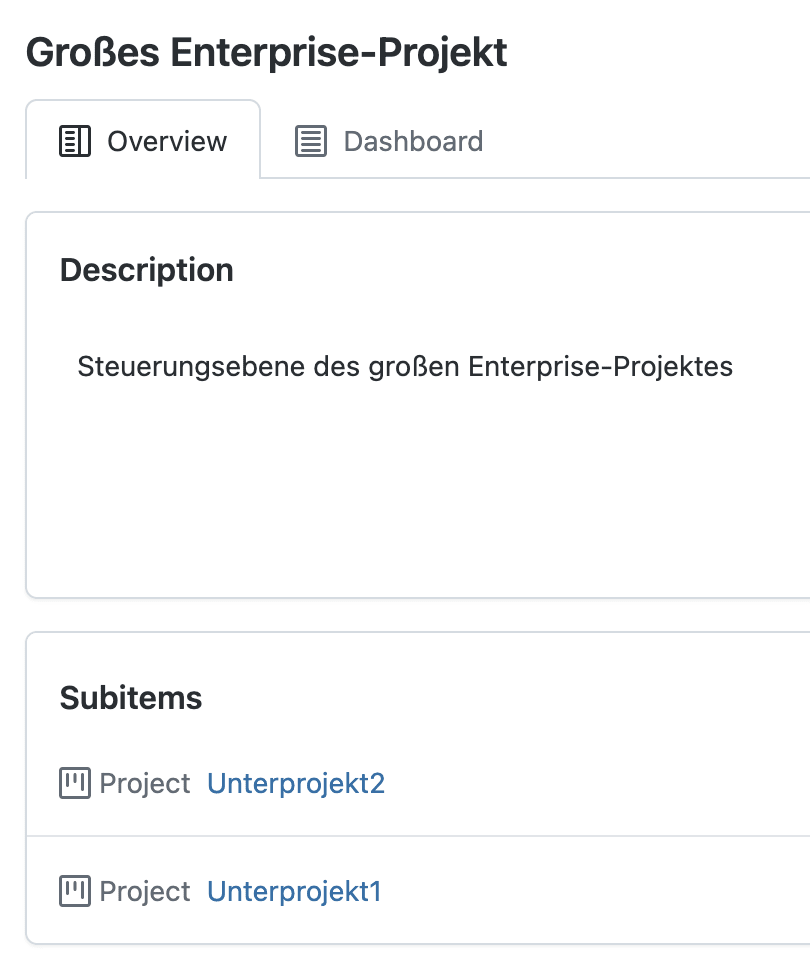
In theory, you can nest projects and work packages in OpenProject as deeply as you like. Even so, you should determine which structure makes sense in your context. For my example, I use a project with two subprojects. The structure stays clear and yet shows the most important features. The top-level project represents the strategic project planning. The two subprojects map the operational team level.
If needed, you can subdivide the subprojects further and add additional levels.
Large Enterprise Project
Planning an Initiative
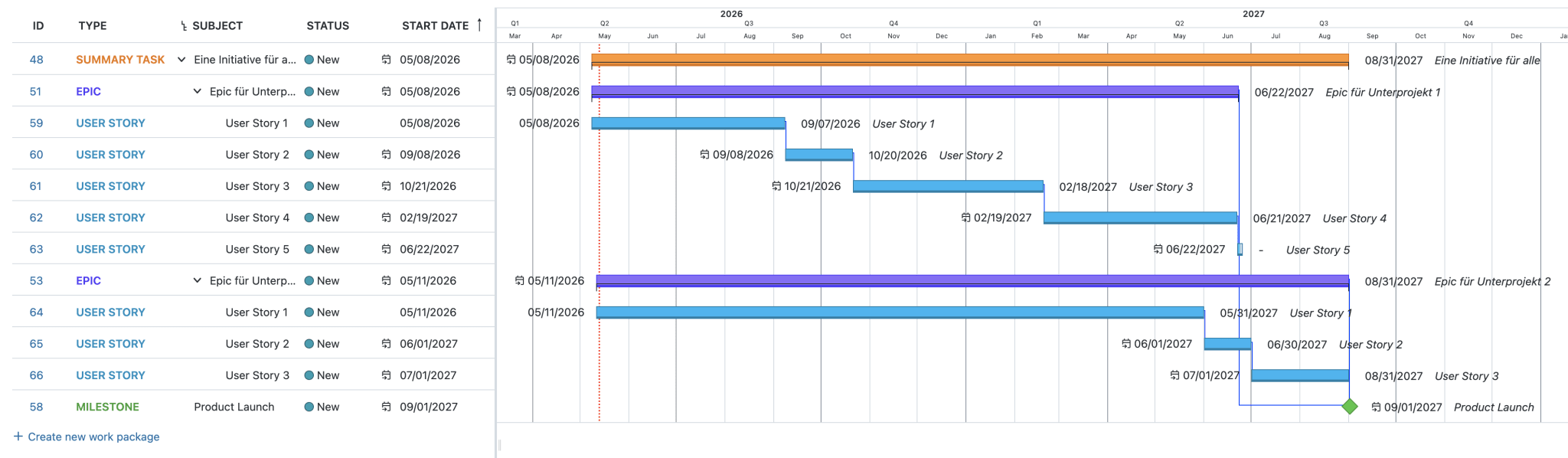
In my example, I now create a cross-project initiative at the strategic project planning level. Then I create two epics for the subprojects. In addition, I create a milestone that will later help me keep an important deadline for the overall project in view.
A cross-team initiative, broken down into two team-specific epics
I then assign the epics to the subprojects. The following screenshot now shows the work packages view in subproject 1. Here I've already broken the epic down into 5 user stories.
An epic in the subproject, broken down into different stories
Carrying Out the Work in the Project Teams
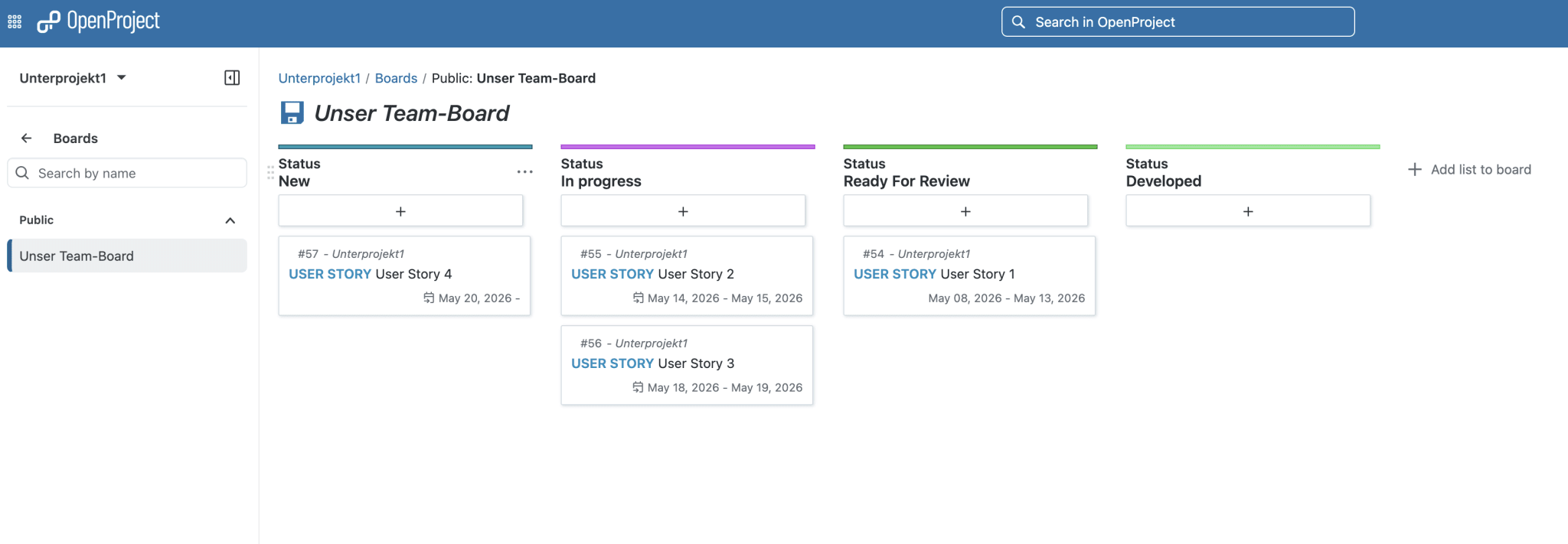
Within the subproject, I can hide the context of the overall project and concentrate on my team's project context. The following screenshot shows the board of the team in subproject 1. I'll explain in detail further below how OpenProject supports agile work.
A Sprint Board
Overview at the Overall Project Level
At the overall project level, you can display a Gantt chart for the entire project. The view is also available in the subprojects. Since strategic steering happens at the overall project level, however, I focus on this view here.
For the Gantt chart to remain meaningful, the teams in the subprojects have to maintain their work packages cleanly. This includes above all predecessor and successor relationships as well as the start and end dates of the work packages at the lowest level.
If you set work packages at higher hierarchy levels to "Automatic Scheduling," OpenProject adopts changes from the lower levels automatically. If a date shifts there, the parent date updates as well.
The milestone here is defined as a successor of the epics. If the end date of an epic changes, OpenProject moves the milestone along with it automatically.
The cross-project Gantt chart: the milestone shifts automatically along with the epics
My Assessment of Hybrid Project Management in OpenProject
I have personally never worked on projects that were managed in a recognizably hybrid way. Instead, I've experienced teams working in an agile way while management imposed fixed deadlines. In such scenarios, a project setup in OpenProject like the one shown would have provided more transparency and better understanding.
I can only assess what I experienced while creating my example scenario. What I particularly like is that hierarchies for projects and work packages can be created very flexibly in OpenProject. For meaningful Gantt charts, however, you quickly leave the bounds of agile work at the team level. The relationships between the work packages have to reflect reality. In addition, start and end dates have to be maintained. Here I missed a feature that automatically takes over start and end dates from the sprint a work package is assigned to. It would also be helpful to make ongoing sprints directly visible in the Gantt chart.
Overall, the approach still wins me over: teams can work in an agile way while project steering keeps an overview – without additional status reports.
Agile Project Management in OpenProject
Agile development teams are interested above all in one question: How does OpenProject support them in their day-to-day work? I focus mainly on Scrum and Kanban. Jira also relies on these two frameworks. First, it's about Scrum. Kanban comes in selectively, because OpenProject, in my impression, offers more features for Scrum than for Kanban.
How Does OpenProject Support Sprint Planning?
You generally create tickets in the Work Packages module. There, teams describe tasks, break them down into subtasks, and maintain dependencies between the work packages.
The actual planning runs in the Backlogs module. OpenProject has expanded this area significantly in recent versions. Previously, the module mainly managed generic version assignments. Today, OpenProject knows sprints as clearly defined containers for tickets. Teams assign a start and end date for each sprint. As soon as a sprint starts, OpenProject automatically creates a board with all the tickets of the current sprint. During the sprint, the system also displays a current burndown chart.
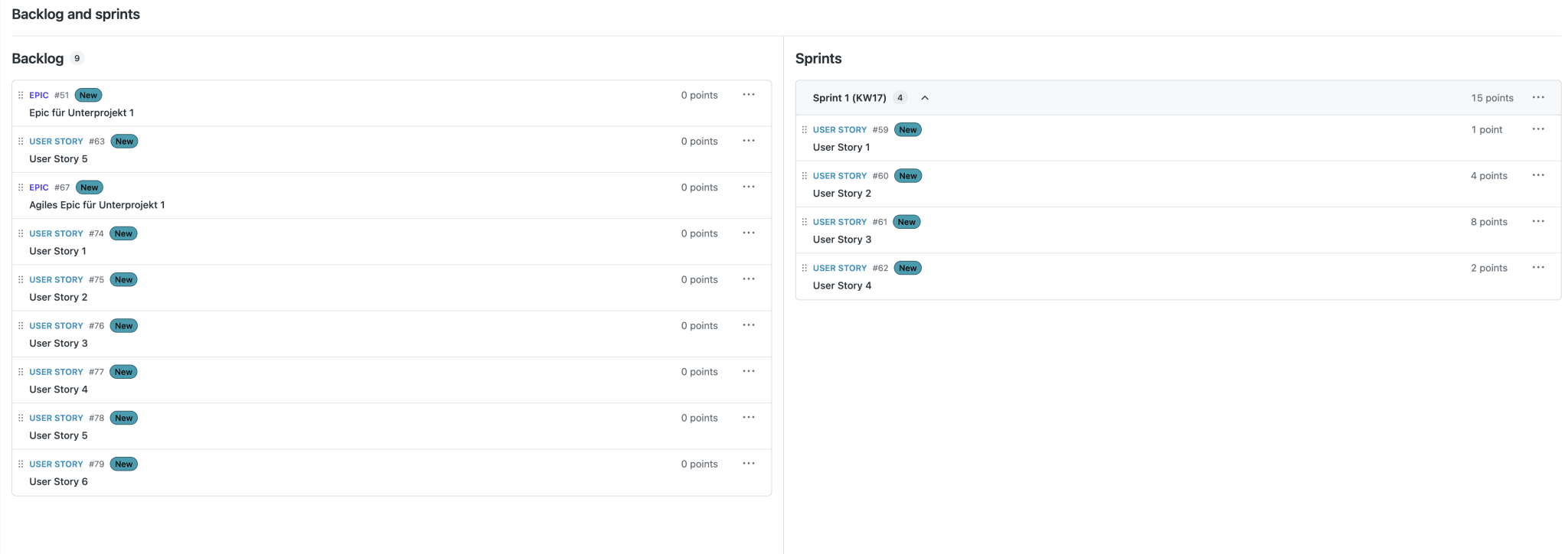
The screenshot shows OpenProject's planning mode. On the left are all tickets in the backlog. That's where all work packages live that are still open and haven't been assigned to a sprint. On the right, the created sprints appear. In the header, OpenProject sums up the story points of all the included tickets.
I find the side-by-side display of backlogs and sprints particularly well done. Both areas can be scrolled independently. That creates clarity. In Jira, both areas are stacked on top of each other. There, you quickly lose your orientation when scrolling.
A bit hidden is the option to spontaneously create new work packages during planning. It's tucked away in the three-dot menu in the sprint header.
he planning mode: backlog and sprints side by side
Different Kinds of Boards
Once planning is done, it's worth looking at how OpenProject supports the team's collaboration. There are several kinds of boards for this, which I'd like to walk through briefly.
In Principle, There Are Two Kinds of Boards:
Basic Boards are part of the Community Edition. They work simply but have clear limitations: you have to populate these boards manually. Every ticket that should appear on the board, you have to add individually by hand. Tickets therefore don't land on the board automatically just because they belong to a particular sprint. Moving tickets also has no effect on their fields. If you drag a ticket into another column, the processing status, for example, doesn't change automatically. If a column stands for the status "In Progress," for instance, the ticket status remains unchanged despite the move. You then additionally have to set the status to "In Progress" manually.
Action Boards behave the way most of us probably expect when coming from Jira: tickets land on the board automatically once they're part of the current sprint and I've set the board filter accordingly. The corresponding fields also change automatically when I move a ticket to the appropriate column. At first I was a bit disappointed to find that Action Boards are only available with an enterprise license. By now, though, I understand the decision, because Action Boards are a strong argument for buying an enterprise license – and that, in turn, helps ensure OpenProject has a future and remains a safe investment for its customers.
Different Kinds of Action Boards:
OpenProject offers many interesting Action Boards. They solve typical usage scenarios clearly and directly. In Jira, I often used to have to click my way laboriously through tickets across many different pages to do this. I don't know whether Jira offers similar solutions. I'd like to give a brief overview of the Action Boards OpenProject offers:
The Kanban Board corresponds to the classic board from Jira. The columns show the current status of each item. This makes the board well suited for everyday work in agile software development. Even though the name doesn't suggest it, the Kanban board is also the basis for organizing daily work when you work according to Scrum. One puzzling thing, though: there are no WIP limits at all. Yet limits on parallel tasks are among the core principles of Kanban. Without them, teams quickly lose track and bottlenecks go unnoticed for longer.
The Assignee Board organizes tickets by responsible team members. It quickly shows how heavily the team is loaded. This lets you see at a glance: are tasks piling up on individual team members? Who still has spare capacity?
In the Version Board, each column stands for a product version. The board helps Product Owners create release plans and assign features to planned software versions.
The Subproject Board works similarly to the Assignee Board. The columns, however, are organized by subprojects. This way you can see at a glance which tasks belong to which subproject. Subprojects have a functional focus. You can't spontaneously assign arbitrary tasks to them. That's why you don't use the board to find spare capacity; it's more about the question: which team is currently working on which topic?
In the Parent-Child Board, the columns reflect the parent work packages. The board helps you create a project breakdown structure or a Work Breakdown Structure (WBS). You can quickly see whether the subtasks are assigned to the right work packages. If needed, you can easily adjust the structure.
Does OpenProject Also Support Me Within Scaled Agile Frameworks?
I'm not very familiar with scaled agile frameworks, so honestly I don't trust myself to give a qualified verdict on support for scaled agile frameworks. In my view, however, OpenProject offers a great deal of flexibility for mapping different organizational structures through the ability to nest projects within one another. In addition, I'd like to introduce two more features that I haven't mentioned so far.
You Can Share Sprints: If you want to synchronize sprints across multiple projects, there's the option to create a shared sprint in a parent project. This sprint is then visible in all subprojects it is shared with. Only the time frame is shared. The contents of the sprint at the team level continue to be decided at the team level. The overall sprint, however, is started and stopped at the parent project level.
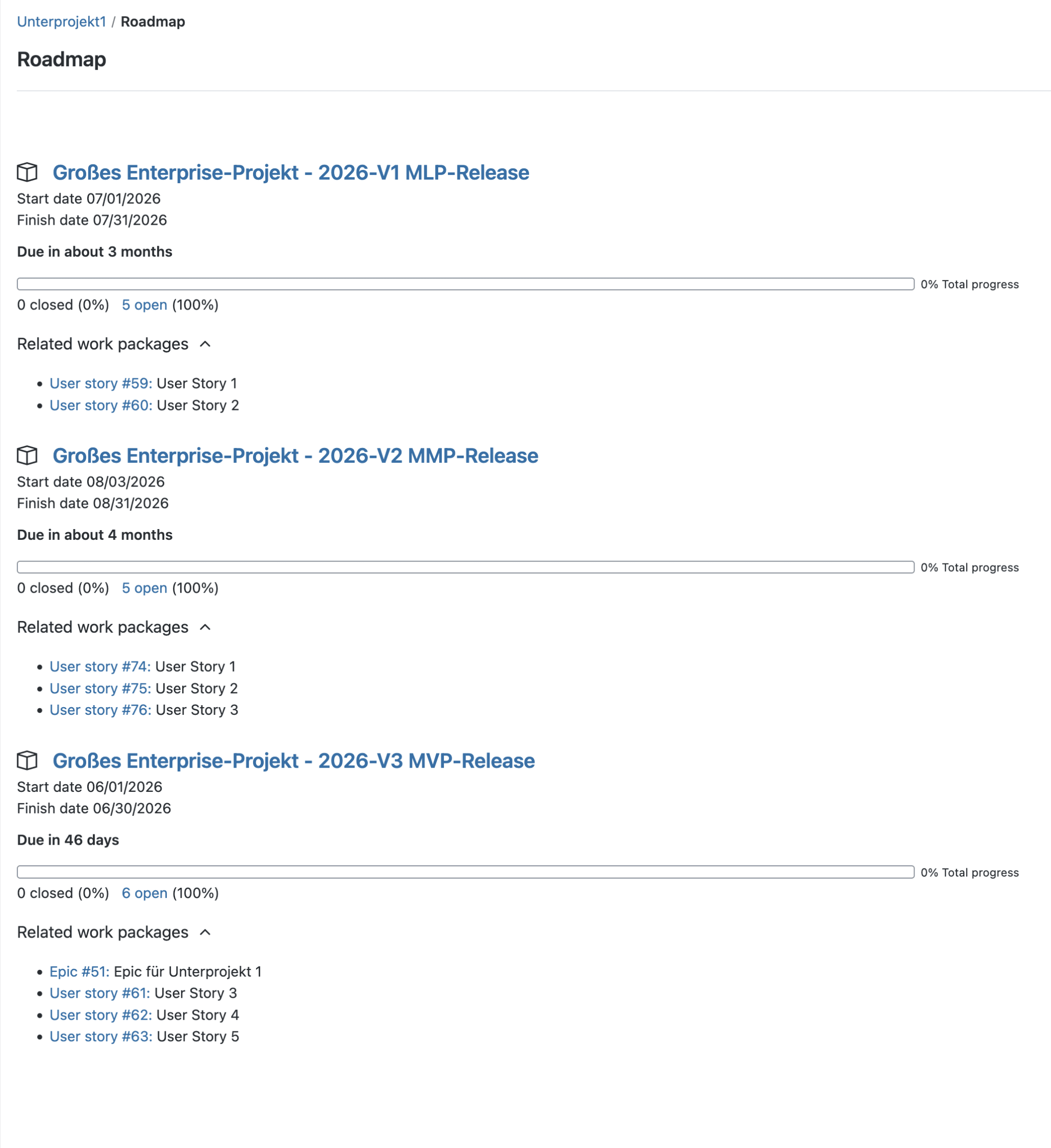
Roadmaps und Versione: Since OpenProject implemented real sprint containers, you have to hunt around a bit the first time after creating versions. You'll find version management in the Project Settings of the project in question. As soon as you've set up a first version, OpenProject's Roadmap module is unlocked. In the example, I created the versions in the parent project and shared them with the subprojects. If you work with SAFe, you could use this to map a Program Increment, for instance. You can assign versions a start and end date.
A roadmap overview
How Do I Rate Agile Project Management in OpenProject?
Overall, I consider agile project management in OpenProject a success. At first I was disappointed: with the Basic Board you don't get very far. Anyone who wants to use OpenProject sensibly needs at least the Basic enterprise license. Only then are the Action Boards available. With those, you can work in an agile way reasonably well, in my view.
The user interface, however, doesn't strike me as particularly modern. That's not down to individual features, but to the overall impression.What I found positive was the planning mode: there, backlog and sprints can be displayed side by side. Moving tickets is therefore easier than in Jira.
What really bothers me, however, is that you can't set WIP limits per column. As a result, OpenProject supports Kanban only inadequately, in my view. Anyone who mainly uses Scrum probably won't have a problem with this. Here Jira currently still has the edge for me.
On support for scaled agile frameworks, I can't give a well-founded verdict. For that, I know the corresponding features in Jira too little. I have, however, shown you what can be done with OpenProject. I hope this helps you form your own opinion.
Classic Project Management in OpenProject
From the angle of classic project management, I didn't examine OpenProject more closely. It's been a long time since I last experienced a project run according to the waterfall model. In my day-to-day work, this model no longer plays a role. Even so, we've already come across some features for classic project management:
Work packages can be arranged in a logical order.
Work packages can have a start and end date.
Milestones can be created independently of work packages and placed into the order.
Projects and work packages can be nested hierarchically.
Cross-project Gantt charts are possible.
I also assign some additional features to classic project management. They can, however, also be useful in more agile projects. I didn't examine them in detail and rely here on the official documentation.
Budget Planning and Budget Monitoring
In OpenProject, you can create project budgets. They cover planned personnel costs as well as material costs such as supplies or travel expenses. The system calculates personnel costs based on the users' stored hourly rates. For material costs, teams can define their own cost types with individual units and rates.
Time Tracking and Consumption Control
If you want to use AI in combination with OpenProject, then here too – as in our Jira example – the route is through an MCP server. There are several options for this.
Change Tracking with Baseline
OpenProject doesn't offer a classic baseline function like Microsoft Project, where a project plan is stored as a fixed snapshot. Instead, the baseline function compares table views of work packages with an earlier state, such as yesterday, last week, or a specific date.
The system marks changed, added, and removed work packages. Old and new values appear directly side by side. A representation in the Gantt chart doesn't exist yet. With the exception of the comparison to the previous day, the baseline function is part of the enterprise version.
Teaching the AI to Talk to OpenProject
If you want to use AI in combination with OpenProject, then here too – as in our Jira example – the route is through an MCP server. There are several options for this.
OpenProject Already Ships with Its Own MCP Server
If you use OpenProject with an enterprise license, you can use the MCP server integrated into OpenProject. So far, however, this one doesn't yet have any write operations. But that's enough if, for example, I want to ask my coding agent to implement a particular ticket. That worked flawlessly in combination with Claude Code.
There Is a Large Number of Already-Implemented Open Source MCP Servers
If, however, you want to use AI to automatically generate work packages in OpenProject from meeting minutes, you need an MCP server that also supports write operations.
A quick Google search quickly yields many usable options. In principle, there are two different ways clients can communicate with MCP servers:
Standard input/output (stdio): In this case, the client starts the MCP server itself locally and communicates with it directly via the command line.
Network server/HTTP: In this case, the MCP server is made available remotely on the network and the clients communicate with it via HTTP.
The standard input/output approach has the advantage that the MCP server runs with each user's personalized API token, so it has exactly the same privileges as that user and can only do what that user is allowed to do. The downside is that everyone has to install their own instance of the MCP server. In some cases, that can be a problem.
It passes each user's API token through to the OpenProject API, so here too usage stays within that user's privileges. At the same time, you only need a single central instance of the MCP server for everyone. For the concrete use of OpenProject with a local AI model in LM Studio, I refer you to the article by my colleague Nicolas Inden. You can transfer that 1:1 to use with OpenProject.
More Useful Features of OpenProject
Wiki and Documents
OpenProject ships with its own wiki. It doesn't replace Confluence, because each wiki belongs to a specific project. It is therefore suited above all for project-specific documentation. What's a little confusing is that OpenProject also offers a Documents module. There, you can create various document types, such as Proposal, Idea, Specification, or Documentation. I would use the wiki
when several people work out content together,
when the documentation is structured hierarchically,
when pages link to one another,
when you prefer to write text in Markdown.
Every wiki entry is stored internally as Markdown. You can switch between Markdown and WYSIWYG view at any time. The wiki is based on CKEditor 5, the Documents module on BlockNote. That's why the Documents module currently lacks a Markdown mode.
Once a document is finished, it can in principle be transferred into the Documents module. OpenProject doesn't, however, offer an elegant way to do this. You can export a wiki entry as a PDF and import it as an attachment, or copy and paste the content.
Since OpenProject 17.0, documents support real-time collaboration. I would have expected this feature in the wiki instead. The reason is probably that the technical basis of the Documents module makes it possible. Conceptually, though, I find it confusing. It may indicate that OpenProject wants to position the Documents module as the long-term successor to the wiki. That, however, is speculation. For me, though, it explains why the wiki and the Documents module are currently hard to clearly distinguish from one another.
Organizing Meetings
The Meetings module is especially suitable when you want to closely link meetings with work packages. You can assemble an agenda from work packages or from separate agenda items. If you use work packages as the agenda, you capture the results directly there and then track progress afterward. If you work with agenda items, you store the notes in that item. This information, however, is hard to find again later, because you have to reopen the meeting to do so. It's more practical to create a new work package directly from an agenda item, or to update an existing one. The invitation feature is helpful too. Via the Meetings module, you can send invitations directly to all participants. That saves a number of manual steps.
Integration with GitLab and GitHub
OpenProject can display activities from GitLab or GitHub in the Activity tab of the associated work package. I only tested the feature with GitLab. There, it worked reliably.
Integration with Nextcloud
OpenProject integrates closely with Nextcloud. While I didn't test the integration myself, it is well documented here on the OpenProject website. The integration works in both directions. You can link work packages with files in Nextcloud and have an overview of your work packages displayed in Nextcloud.
Creating Work Packages via Email
Work packages can also be created via email. Beyond that, you can reply to notifications about work packages. OpenProject automatically adds your reply as a comment to the work package in question. This makes communication considerably easier.
Jira Migrator
The OpenProject team offers a dedicated tool for migrating existing projects to OpenProject: the Jira Migrator. I didn't have the opportunity to test the tool. You'll find a detailed description of its features here.
Appendix: Which Candidates Did I Look at Besides OpenProject?
At the start of my search for data-sovereign Jira alternatives, I used internet research and my favorite AI model to get an overview of the open source alternatives to Jira. I'd like to briefly cover here the candidates I looked at first and then ruled out.
GitLab: Since we already have an internal GitLab instance and GitLab generally also offers the ability to manage tickets, I first looked at the extent to which GitLab meets my criteria mentioned above. In doing so, I came across the fact that epics are a premium feature in GitLab, so you need a premium license, which currently costs $29 per user per month. Compared to other vendors' licenses, that was too high, so GitLab dropped off my list of possible candidates.
Taiga: Taiga is an open source project that focuses on project management for agile projects. The look and feel didn't appeal to me, however, so I didn't investigate it further. What really threw me was that I couldn't move user stories on the board. That was because you can't move the user stories on the Scrum board themselves. They stay in the left column. You have to create subtasks for the stories. You can then move those. If you're looking for an open source tool for a small project, then Taiga is certainly a candidate you can take a closer look at. You can run it on your own hardware free of license costs. There's also a cloud option, however, which you have to pay for. Taiga, though, fundamentally assumes a flat project hierarchy, so that in this respect too it deviates from the requirements profile I specified at the outset.
Plane: Plane is likewise an open source product that can be self-hosted. There are also cloud options, however. Plane appealed to me a lot, because I found the application's UX pleasant. Everything feels clear, tidy, and well-organized. I was able to find my way around very quickly. If I were looking for a project management tool for an agile project that I can self-host, Plane would be my favorite. As a Jira alternative I didn't consider it, because for me Plane is still quite a young project. Plane has only existed for 3 years; OpenProject has existed since 2012. Although Plane also supports project hierarchies, OpenProject struck me as the more mature product that offers more investment security. But Plane is certainly worth a second look too, if OpenProject doesn't suit you.
Summary and Conclusion
So is OpenProject better than Jira? The question is, of course, misleading. Both tools solve similar problems in different ways. What matters is what your organization values. Even though I've already spent a lot of time with OpenProject, I keep discovering new ways to map project scenarios. After a month of intensive work with OpenProject, my conclusion is clear: OpenProject is a serious alternative to Jira. Above all where data sovereignty, predictable costs, and European infrastructure are decisive.
Where OpenProject Is Superior to Jira
Data Sovereignty: OpenProject relies on open source under GPLv3. You operate the software yourself or use an EU cloud at Scaleway. There is no marketplace with uncontrolled third-party data flows.
Hybrid Project Management Without Switching Tools: Strategic planning with Gantt charts and operational teamwork with backlogs and Action Boards run in a single application. With Atlassian, you usually need Jira, Advanced Roadmaps, and additional marketplace plugins for this.
Better Sprint Planning: OpenProject shows backlog and sprint side by side. Both areas scroll independently of each other. That sounds small, but it solves a concrete everyday problem that Jira to this day doesn't solve elegantly.
More Features in the Core Product: The enterprise license, starting with the Professional plan, includes all essential features. You don't need additional plugins. That saves money and avoids typical problems:
rising plugin costs
data protection questions with third-party apps
version conflicts between the core product and extensions
Where Jira Remains Stronger
Kanban: OpenProject doesn't support WIP limits. For teams that use Kanban consistently, that's a real drawback. Limits on parallel work are among the core principles of the method.
Customizability of Workflows and Views: Jira's workflow editor and JQL set the standard. OpenProject is catching up but doesn't yet reach this depth. Anyone running complex Jira workflows should carefully check which features are missing before migrating.
User Interface and UX: OpenProject feels functional and plain. Jira Cloud looks more modern and polished. That's a matter of taste – but it affects the daily work of many teams.
My Personal Conclusion
For me, OpenProject is currently the most compelling data-sovereign alternative to Jira. Not better in every discipline. But stronger in exactly those areas that matter right now – and that will probably matter even more going forward: sovereignty and predictable costs.
I was surprised that such a great open source product comes from Germany and that I hadn't known about it. What won me over above all was OpenProject's flexibility. You can map different organizational and project hierarchies, and you can combine methods from different project management models. That's also why I can't pass any blanket judgment. My recommendation: use the 14-day trial and try out your specific use case for real.
OpenProject is a powerful piece of software and takes some ramp-up to realize its full potential. If you have experience with OpenProject and would like to share it, feel free to send me an email: holger.kraus@innoq.com. If you've spotted any factual errors in this article, I'd likewise be grateful for a brief note.
Holger Kraus
Senior Consultant
Holger Kraus
Senior Consultant
Holger Kraus is a Senior Consultant at INNOQ. He has years of experience designing and developing large-scale IT systems across a range of industries, and currently focuses on distributed web applications in the Java enterprise space.
Holger Kraus
Holger Kraus is a Senior Consultant at INNOQ. He has years of experience designing and developing large-scale IT systems across a range of industries, and currently focuses on distributed web applications in the Java enterprise space.
Sovereignty Review
You know your dependencies. We help you assess what they mean.