Sure, we enjoy trying out the latest frontier model as much as anyone. But in day-to-day project work, what matters most is control over cost, data, and availability. That's why we increasingly rely on open-weights models paired with open source tooling. Here's what our setup looks like.
Nicolas Inden
Senior Consultant
Open models and tools are long past being a gimmick. They're a real, viable alternative, and a good complement to an existing AI setup.
What you’ll learn in this article
Frontier models: relevant, but in day-to-day project work, cost, data protection, and availability often take priority.
Three use cases: chat/expert models, agentic software engineering, product integration.
Setup: OpenWebUI + LiteLLM, inference from EU providers with no US roots.
Result: cost control, EU data, switch providers anytime – for little extra effort.
Content
I'll admit it: we have them too – the crowd that loves using the biggest, fastest, and best of everything. AI is no exception. And that's a good thing, because it's exactly this drive that keeps us on the cutting edge and makes sure we always know what's technically possible in our projects.
AI is a very broad field. So rather than just talking about the latest model, let's talk about concrete usage patterns. By and large, our AI usage falls (so far) into three categories:
Chat for information research, or using self-built "domain experts"
For all of these areas, the well-known US providers give us (among others) convenient, comfortable tools – from ChatGPT to Claude Code to their respective API platforms. But now that AI usage has recently "grown up," the focus is no longer solely on using the biggest, fastest, and best model. Practical, legal, and economic considerations come into play as well:
How are the costs of our AI usage trending?
Where is my data processed, and who has access to it if it comes to that?
Can I switch to another provider without much effort if the model I'm using is no longer available?
Looking at Anthropic and OpenAI alone, a single user already ends up with four different accounts if they want to use all the services, because both Anthropic and OpenAI each offer a subscription plan (claude.ai and chatgpt.com) as well as an API offering (Claude Platform and OpenAI Platform). The subscription includes chat and agentic coding as quotas, but of course here too you can feed in more coins to break through the limits. The API offering is always billed pay-per-use per token. Keeping the full picture in view takes a bit of effort. And anyone who doesn't set notifications or limits on the API platforms will be surprised how quickly the bill can climb.
For standard subscriptions and typical project use, neither of these two providers can currently give a satisfactory answer on data protection, because both offer EU-only data processing either on request only or not at all. In no case is Zero Data Retention on offer – that is, the complete deletion of prompt and response data immediately after the response is delivered. This is justified by abuse-detection obligations, which means user prompts are sometimes stored for up to 30 days. At least both providers commit to not using customer data to train their models when their services are used on a paid basis. In the world of open-weights models, EU data residency, Zero Data Retention, and no training on your data are a given. There are plenty of suitable providers in the EU with no roots reaching back to the US.
Why would I want to switch models at all? Well, for one thing, there might be a better or cheaper model elsewhere. But it's also possible that the model I've been using gets pulled out from under me. A prominent example is the now-lifted US government export restrictions on Anthropic's Fable and Mythos models. And even GPT-5.6 currently has to undergo a review before it can be made generally available. There's plenty of speculation about the real reasons behind these restrictions and delays, and we won't join in on that here. But it does show that availability is not guaranteed. This situation is problematic in (at least) two respects:
When proprietary US models are subject to a restriction, it affects every provider of those models. Not only is Anthropic itself barred from offering them, but providers like AWS Bedrock aren't allowed to offer them either. The models are therefore effectively unusable. Open-weights models are immune to this. Once released, the weights can be downloaded by anyone and the model can be run.
Switching away from the proprietary frontier models to an alternative model may be just an API change technically, but it can significantly affect the results of the AI application – so much so that even painstakingly crafted prompts have to be completely reworked to achieve comparable results. With open-weights models, there are many providers for the same models. If I run into problems with one provider, I switch to another – but the model and its behavior stay the same.
To keep all of these points under control, we'd like to introduce a system built from open source software and open-weights models that addresses the three categories and the aspects mentioned above.
The Tooling
The first consideration is figuring out what we want to "operate" ourselves and what we want to consume from existing providers. While running a server with the appropriate software for chat and API access is still fairly straightforward, the considerations for AI inference get more detailed. Open models come in every size, from "runs on my machine" to "needs more than 4 GPUs." If we now assume that we'd like to use modern, large open-weights models that can compete with GPT and Opus, then as of this article's publication date (2026-07-05) we inevitably land on GLM-5.2 and K2.7. At 744B and 1T parameters, the required hardware is considerable. The recommended setup for GLM-5.2 with fp8 quantization is 8x Nvidia H200, and that's just for basic operation, before we even factor in the number of concurrent users.
The sweet spot we currently run in production is:
Self-host the central access points to chat and API
Source AI inference from EU providers
We cover the three main use cases with the following tools:
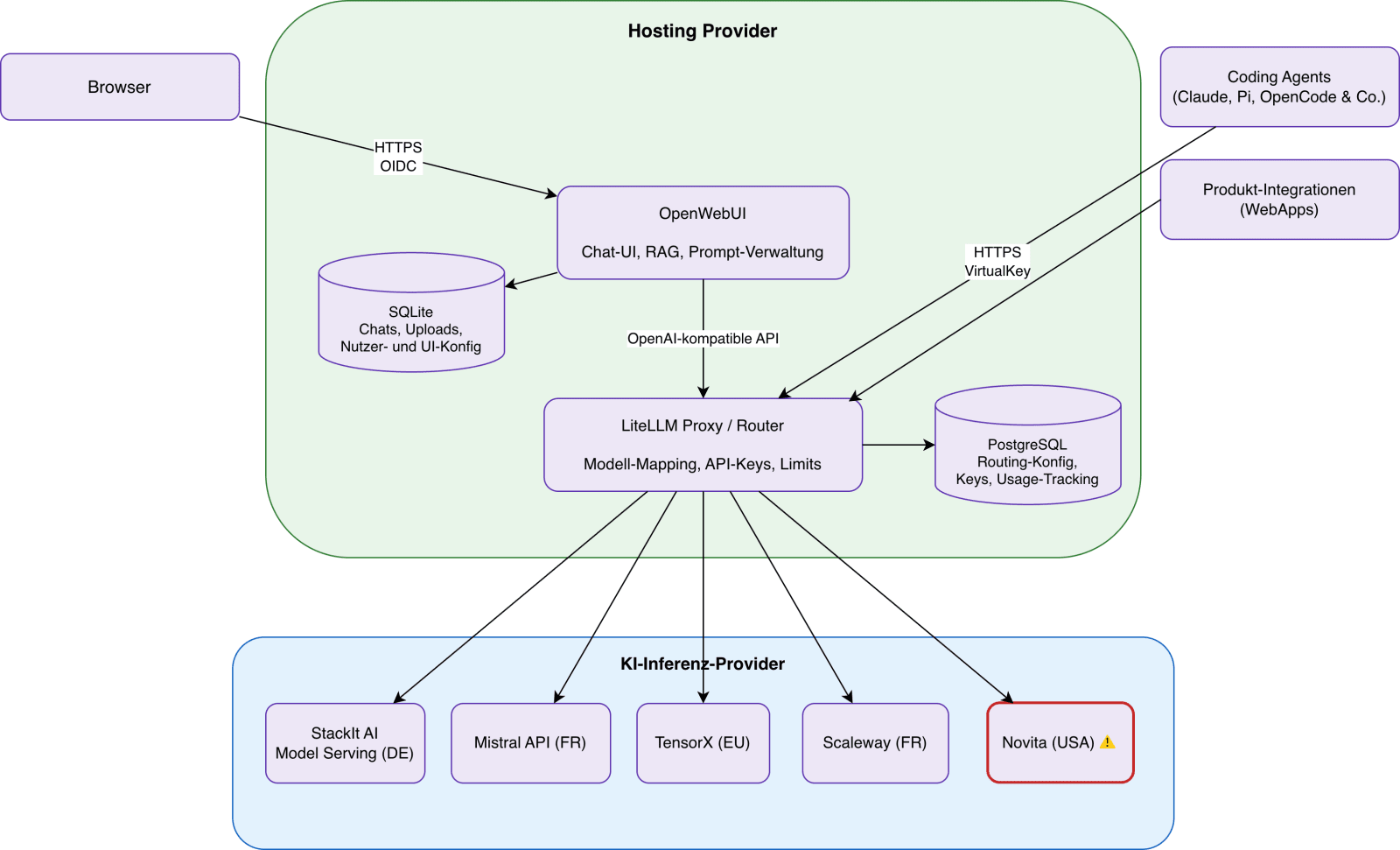
In our specific case, the overview of the overall system looks like this:
An overview of the systems and components in use
If the system isn't intended purely for your own private use and also processes other people's personal data, it's important to make sure Data Processing Agreements (DPAs) are in place with all data-processing parties – essentially the hosting provider for OpenWebUI and LiteLLM, and the AI inference providers.
Don't underestimate the ongoing maintenance involved in running it, either: models get updated, providers change prices or scale back their offerings, and VirtualKeys along with their budget limits need to be reviewed regularly. The extra effort is manageable, but it isn't zero.
OpenWebUI for Chat und Expert Models
OpenWebUI offers a comfortable web interface similar to those of ChatGPT or Claude. The difference is that, behind the scenes, it can use open AI models from a wide range of providers, whether self-hosted or via a provider's API. Beyond simple chat, OpenWebUI offers a whole range of features that let you bring additional knowledge into play.
Noes let you capture text or speech and search across it in chat requests
Knowledge lets you ingest data into a vector database and access it via RAG
MCP lets you access a wide variety of available information sources via MCP
With these features, I can build myself a knowledge hub, whether project-specific or company-wide.
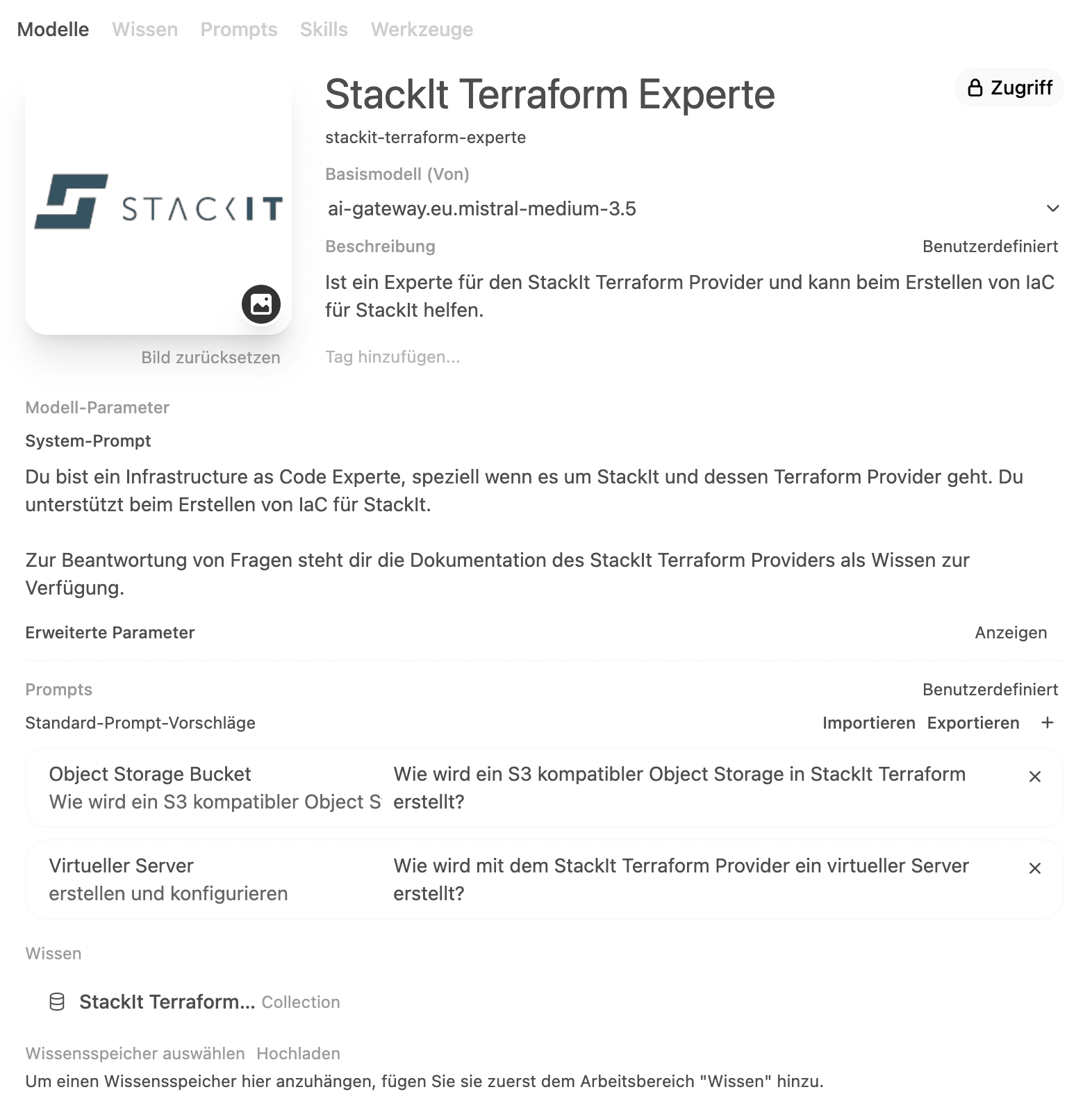
For example, the Knowledge feature lets you build an expert on a particular topic. We tried this out ourselves as an example with StackIt's Terraform provider. Its documentation is freely available as a collection of Markdown files and can be ingested as "knowledge" in OpenWebUI. If we now create a new model in OpenWebUI, we can link a base model like GLM-5.2 with knowledge from OpenWebUI. We'll call this new model, say, "StackIt Terraform Expert." Together with a suitable system prompt for the new model, we can now ask questions about writing Terraform code for StackIt.
Another scenario is accessing internal company information. Via MCP, models in OpenWebUI can be connected to sources like OpenCode, Jira, and Confluence. So the ever-popular question of where the current slide template lives – and much more – is something the AI can answer too.
or what it's worth, there are also good mobile apps for OpenWebUI that make your own AI system convenient to use on the go. I've had good experiences, for example, with the iOS app Conduit.
Technical Details
Even though the token volume through OpenWebUI is vanishingly small compared to using coding agents, we still like to track this consumption. So we create a dedicated VirtualKey in LiteLLM through which we supply OpenWebUI with AI models via LiteLLM. This also gives us the option to transparently switch the provider of an AI model for OpenWebUI.
LiteLLM for Coding Agents and Product Integration
Wherever AI needs to be addressed via an API, LiteLLM comes into play as a proxy and router. Consolidating all AI API calls through LiteLLM gives us the following benefits:
Centralized cost and usage tracking
Transparently swapping out the provider of a model
Individual, project- or application-specific budgets
One and the same BaseURL, no matter which model I want to use
LiteLLM actually offers a whole lot more features, but these are the most important ones in this context for now.
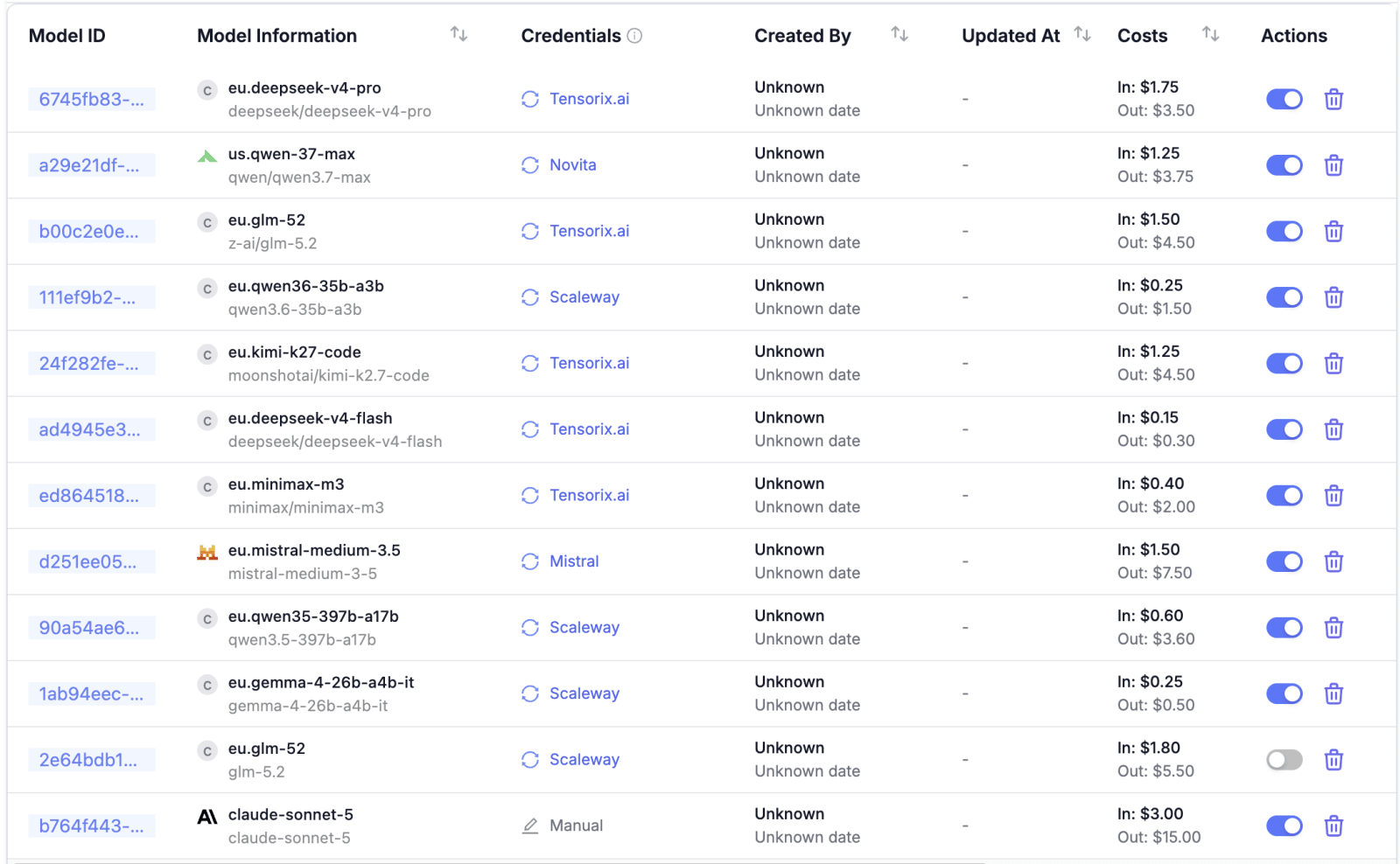
List of models configured in LiteLLM
Setting things up within LiteLLM starts with adding the desired models and provider credentials. If LiteLLM already knows the provider, as it does with Novita for example, a lot of the model information is filled in automatically. This applies above all to the prices for input and output tokens and cache reads. But providers can be added manually too, in which case the pricing information has to be maintained by hand on each model.
To use the models you've just set up through LiteLLM, you need VirtualKeys (API keys) in LiteLLM. These can be assigned to a user, or to a user in the context of a team. That's useful when AI usage should have different budget limits per project.
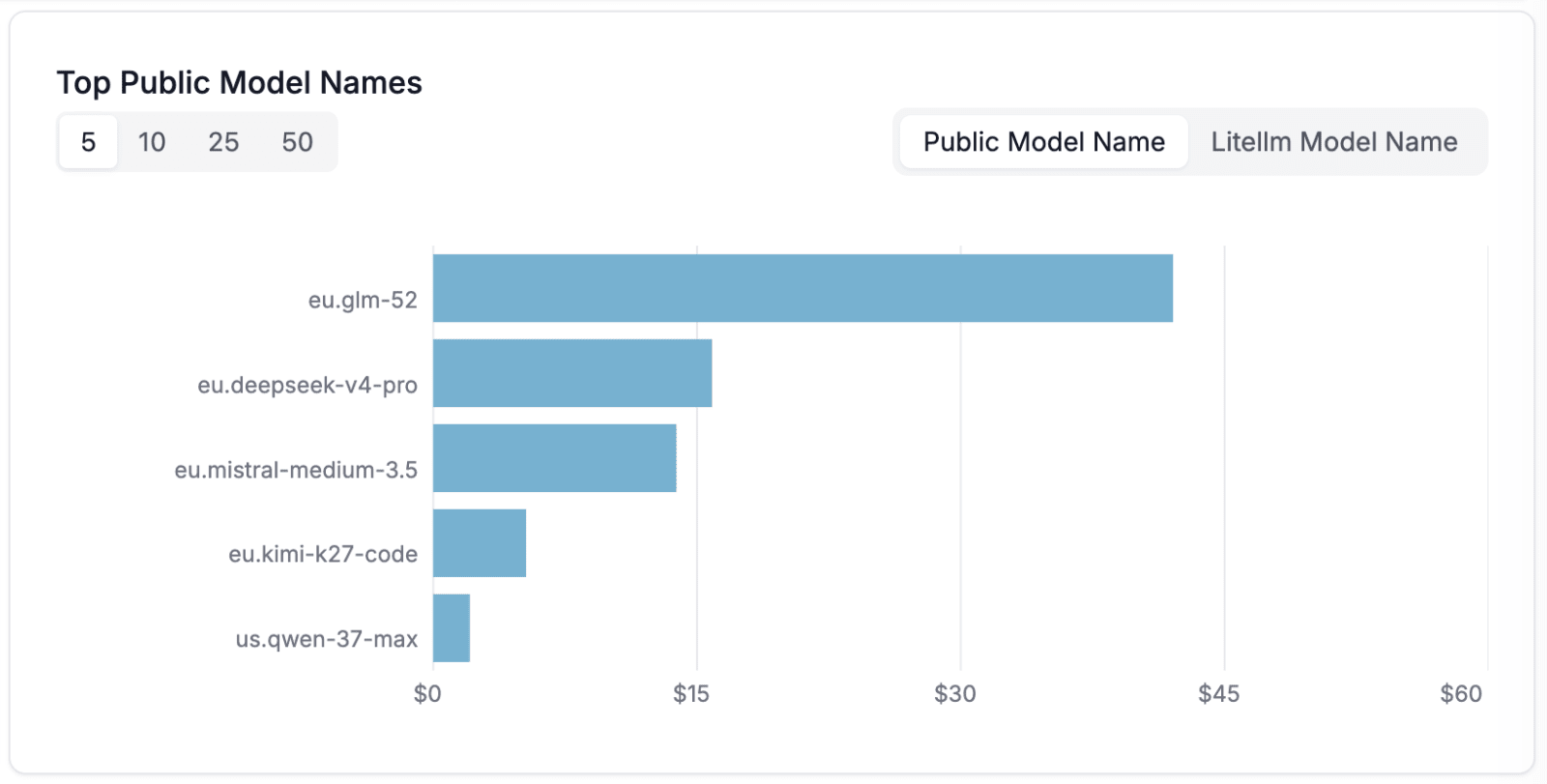
Chart of the most-used models by cost
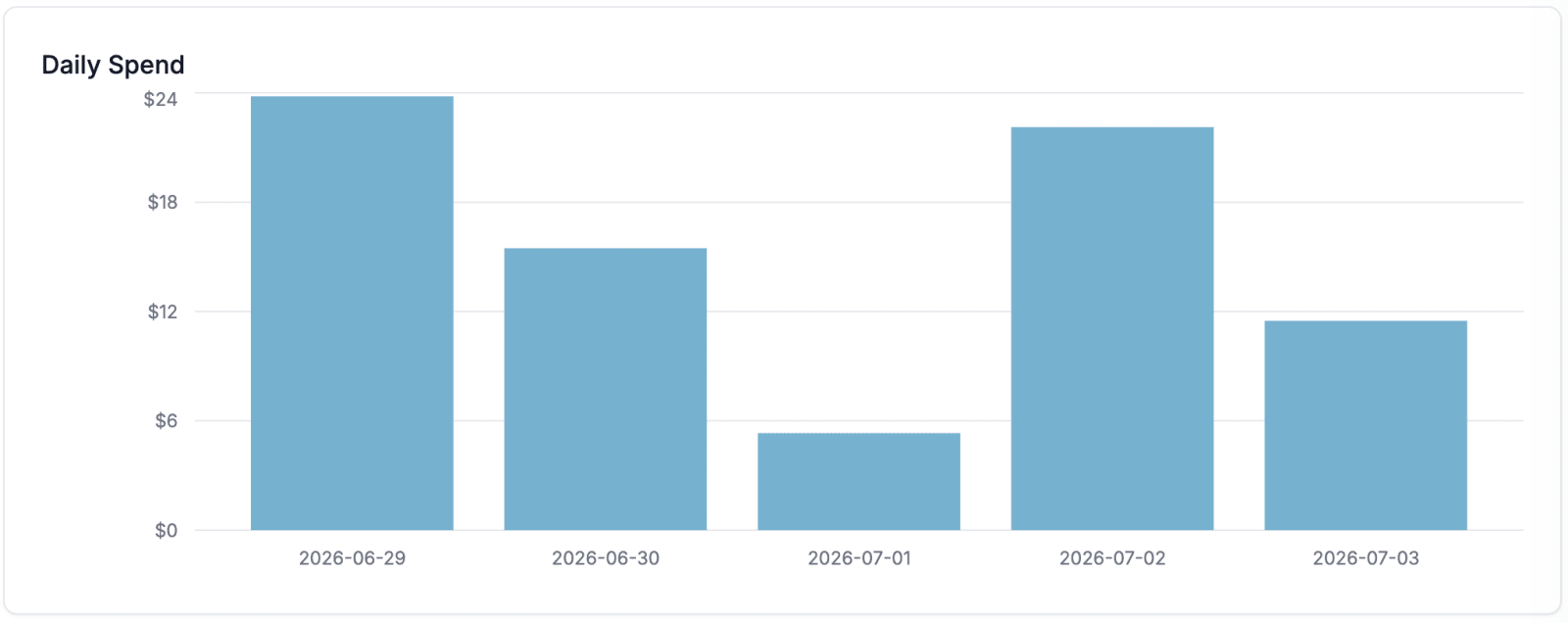
Chart of daily costs
From the tokens consumed and the pricing information, LiteLLM then generates various charts that break down cost and usage from many different angles, for example:
Cost per VirtualKey
Cost per model
Cost per day
Cost per team
It's also worth mentioning here that Anthropic and OpenAI models can be used "through" LiteLLM. This works for users who have a subscription, too. For this, LiteLLM offers two options, "Forward client headers to LLM API" and "Forward LLM provider auth headers," which make sure that the separate headers used by the coding agents to log in to Anthropic and OpenAI are passed through.
AI Inference via API Providers
When researching and testing various inference API providers, the picture has shifted dramatically over the past few months. Whereas at the start of this year it was mainly US providers such as Novita that had current open-weights models available promptly, there are now several providers from the EU with no US roots that also carry current models in their lineup with little delay. Good places to start include:
Even within Germany there are providers for AI inference APIs in StackIt and IONOS, though unfortunately, in our most recent tests, only smaller or outdated models were available there.
Usage
For usage, here are a few practical notes on connecting coding agents and applications to LiteLLM. We'll also look at how to create an expert model in OpenWebUI.
Using Coding Agents with LiteLLM
Here are a few examples of how coding agents can be connected to LiteLLM. The model ID should always be chosen exactly as it was defined in LiteLLM (see the screenshot above).
Claude Code
Claude Code is configured in `~/.claude/settings.json`. The content should look roughly like this:
LiteLLM provides both an OpenAI-compatible API and an Anthropic Messages-compatible API. You can therefore use your existing libraries as long as you adjust the BaseURL and the API key.
In both cases, LiteLLM forwards the requests to the connected provider for the model chosen here as an example, `eu.mistral-medium-3.5`.
Connecting OpenWebUI to LiteLLM
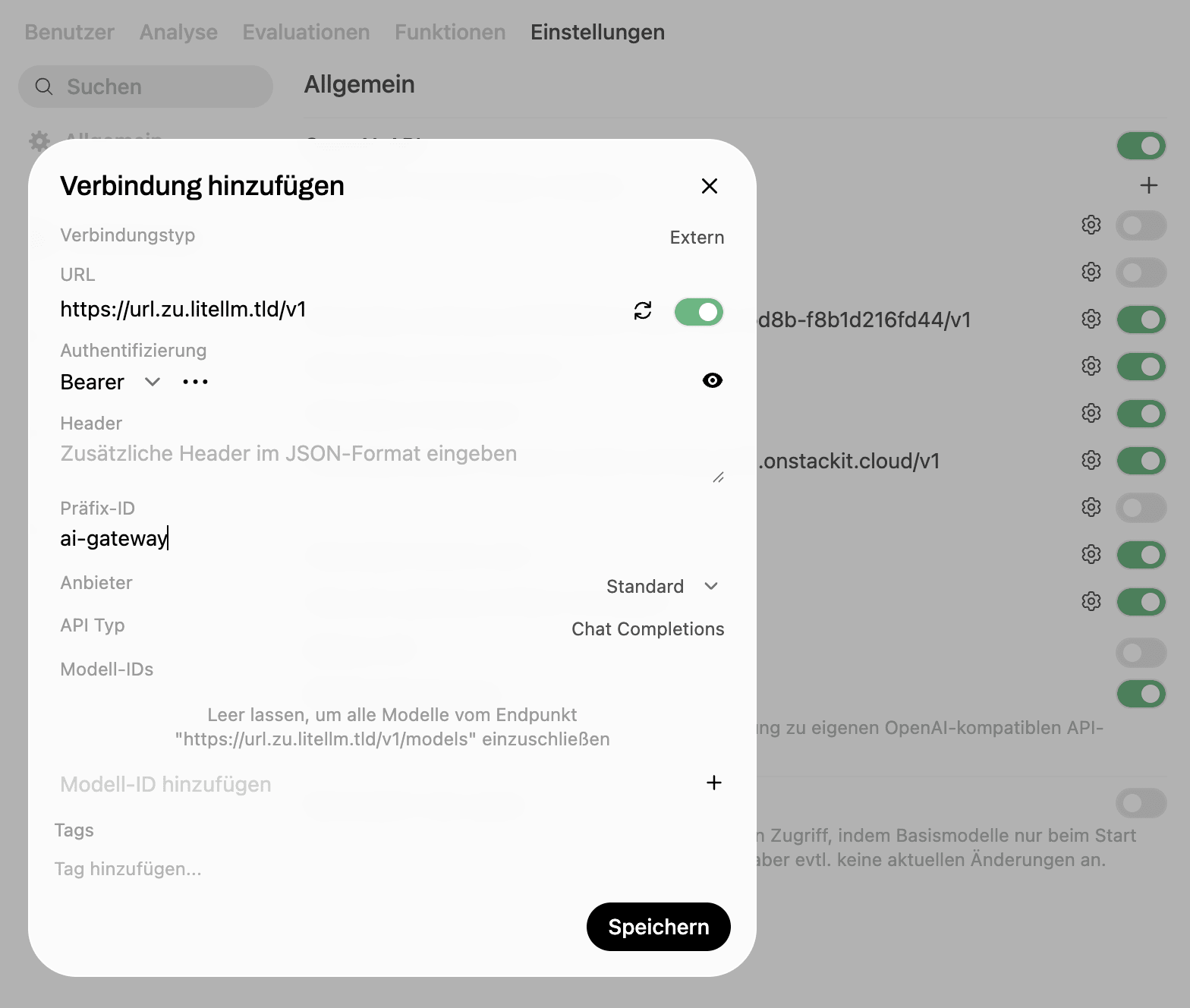
So that our chat, research, and expert-model solution OpenWebUI can also use the AI models we make available through LiteLLM, we need to add our LiteLLM server as a "Connection." You can do this under
"Admin Settings" - "Settings" - "Connections"
Adding a connection from OpenWebUI to LiteLLM
To dothis, we use the URL of our LiteLLM server followed by /v1 and a VirtualKey previously created in LiteLLM for this purpose.
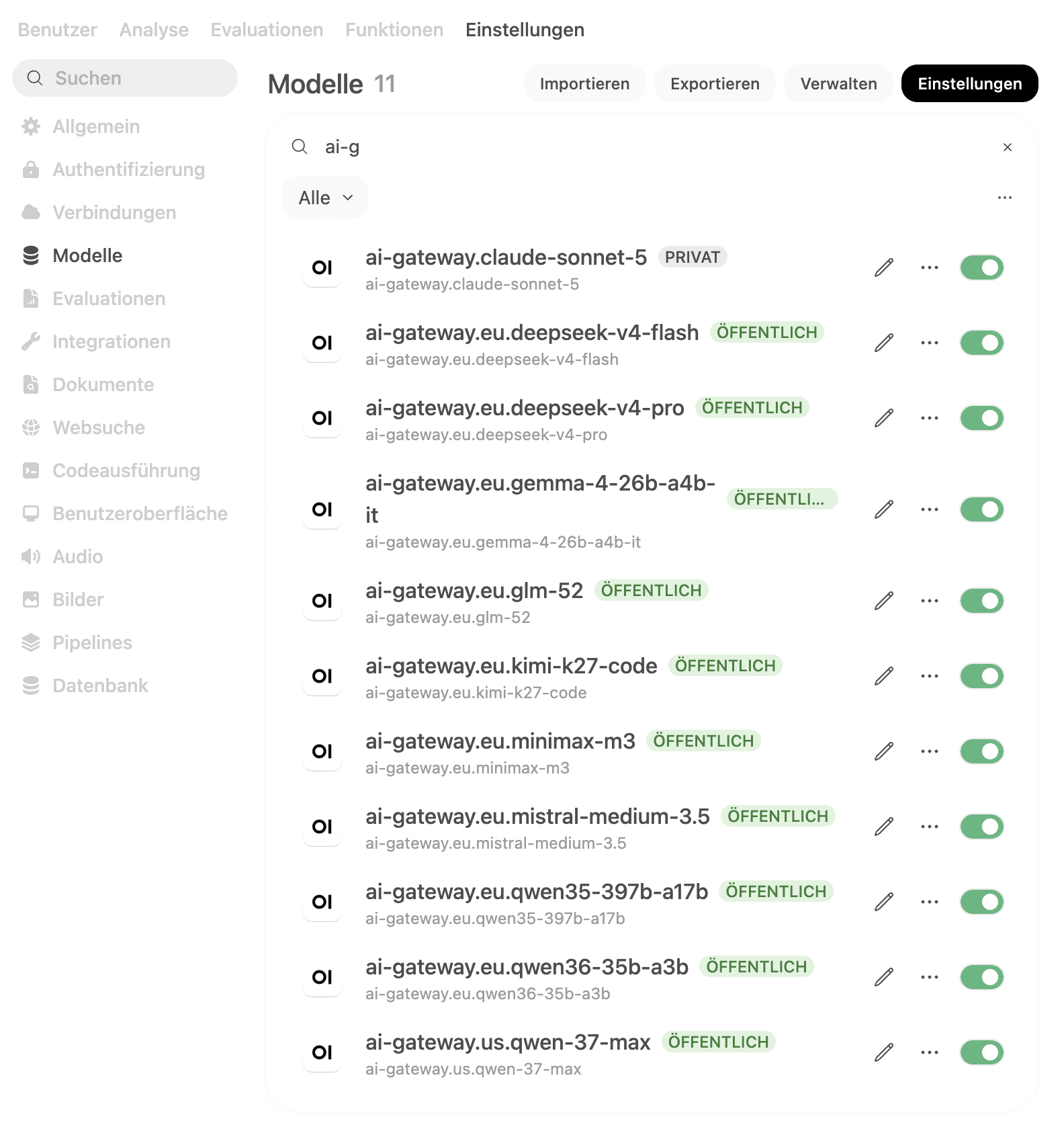
List of models provided by LiteLLM
Under `"Admin Settings" - "Settings" - "Models"` we now see our models displayed and can use them in OpenWebUI.
Expert Models in OpenWebUI
As described at the outset, OpenWebUI offers the ability to use external knowledge via RAG or MCP. Let's walk through this step by step, using the "StackIt Terraform Expert" already mentioned as an example, and use a knowledge base (i.e., RAG) for it.
It's equally possible to connect such an expert to a knowledge source via OpenAPI or MCP.
Step 1: Get the Knowledge
First, we need the knowledge base. The StackIt Terraform provider is maintained in an open GitHub repository, which also includes the documentation as Markdown files. So we start by pulling the repository:
The docs are now in the ./terraform-provider-stackit/docs directory.
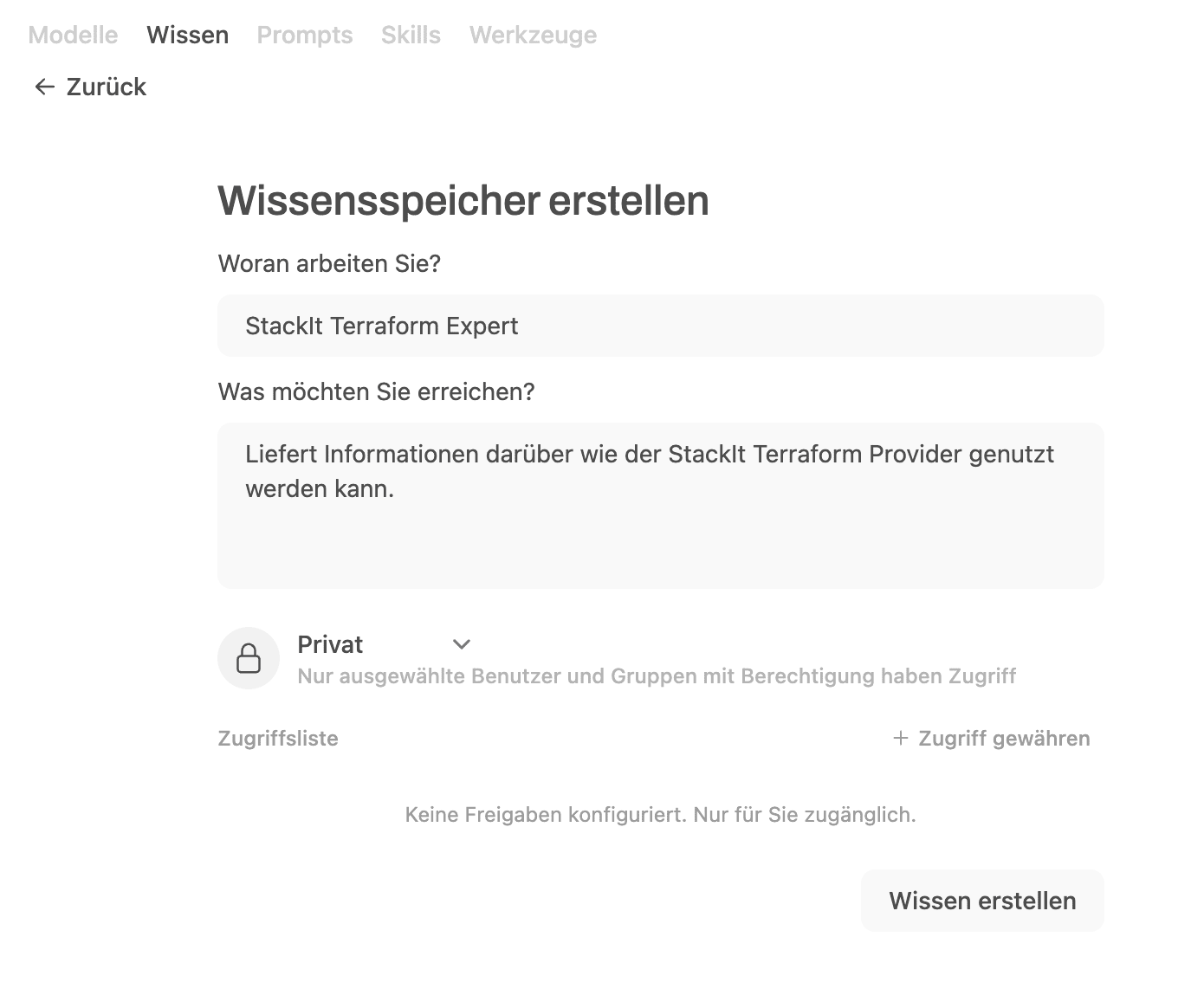
Step 2: Create "Knowledge" in OpenWebUI
Creating a knowledge base
Via "Workspace" - "Knowledge", a new knowledge base is created and given a suitable name and description.
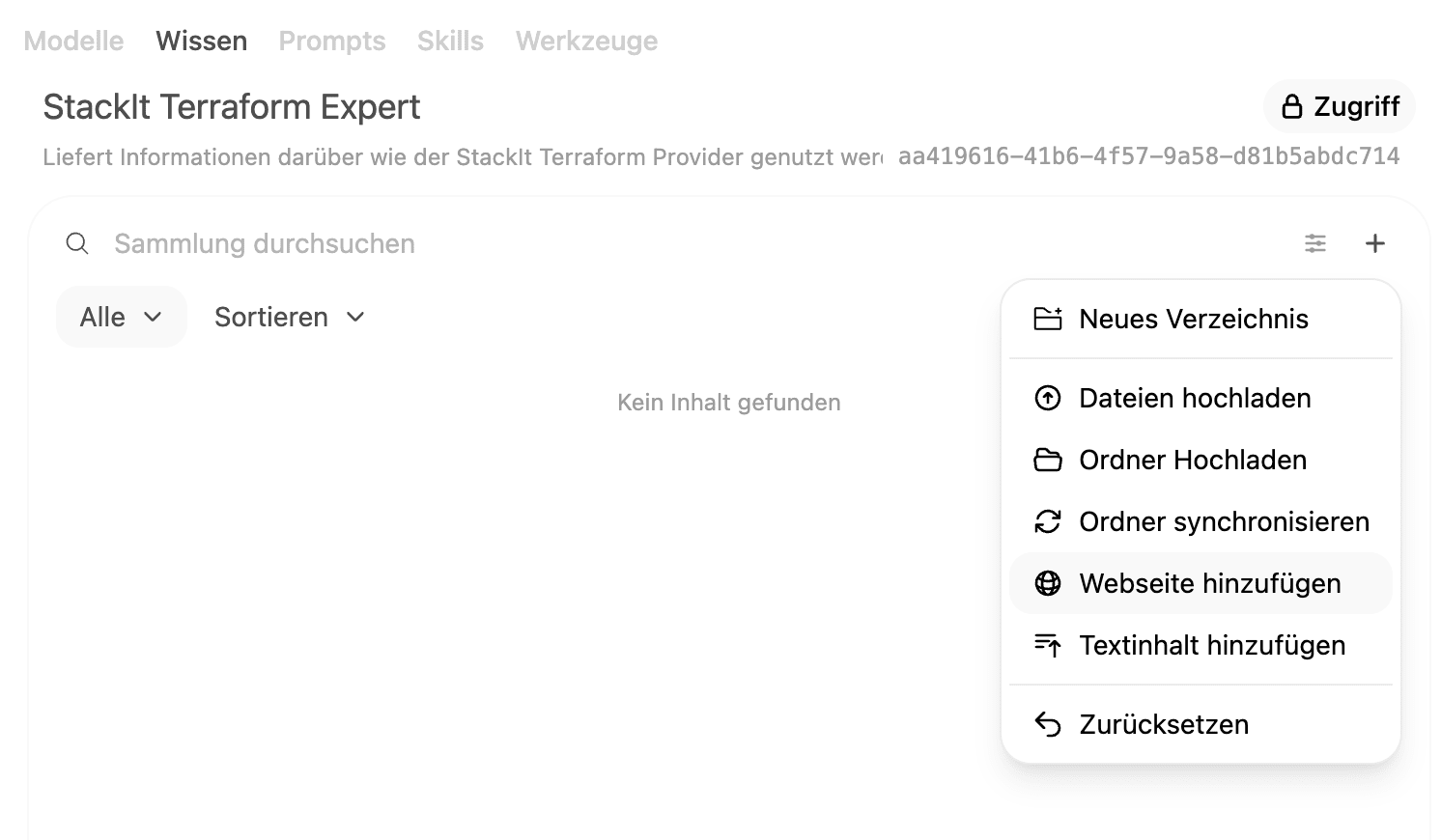
Adding knowledge
After creating it, we now open this knowledge base and, via "Upload folder", upload the docs folder from the repository.
The knowledge base can now be attached to a model as its base knowledge, or brought into any chat with StackIt Terraform Expert.
Step 3: Create a Model and Link it to the Knowledge
We now create a model that automatically uses the knowledge we created earlier.
Erstellen eines Expertenmodells
To do this, we provide the following information:
Model name
Base model (e.g. eu.mistral-medium-3.5)
System prompt
(optional) Default prompt suggestions
Knowledge base
The model is now ready to use and automatically draws on the knowledge uploaded earlier. Under the hood, this uses RAG, whose behavior can also be tuned in detail under "Admin Settings" - "Settings" - "Documents".
Step 4: The First Test
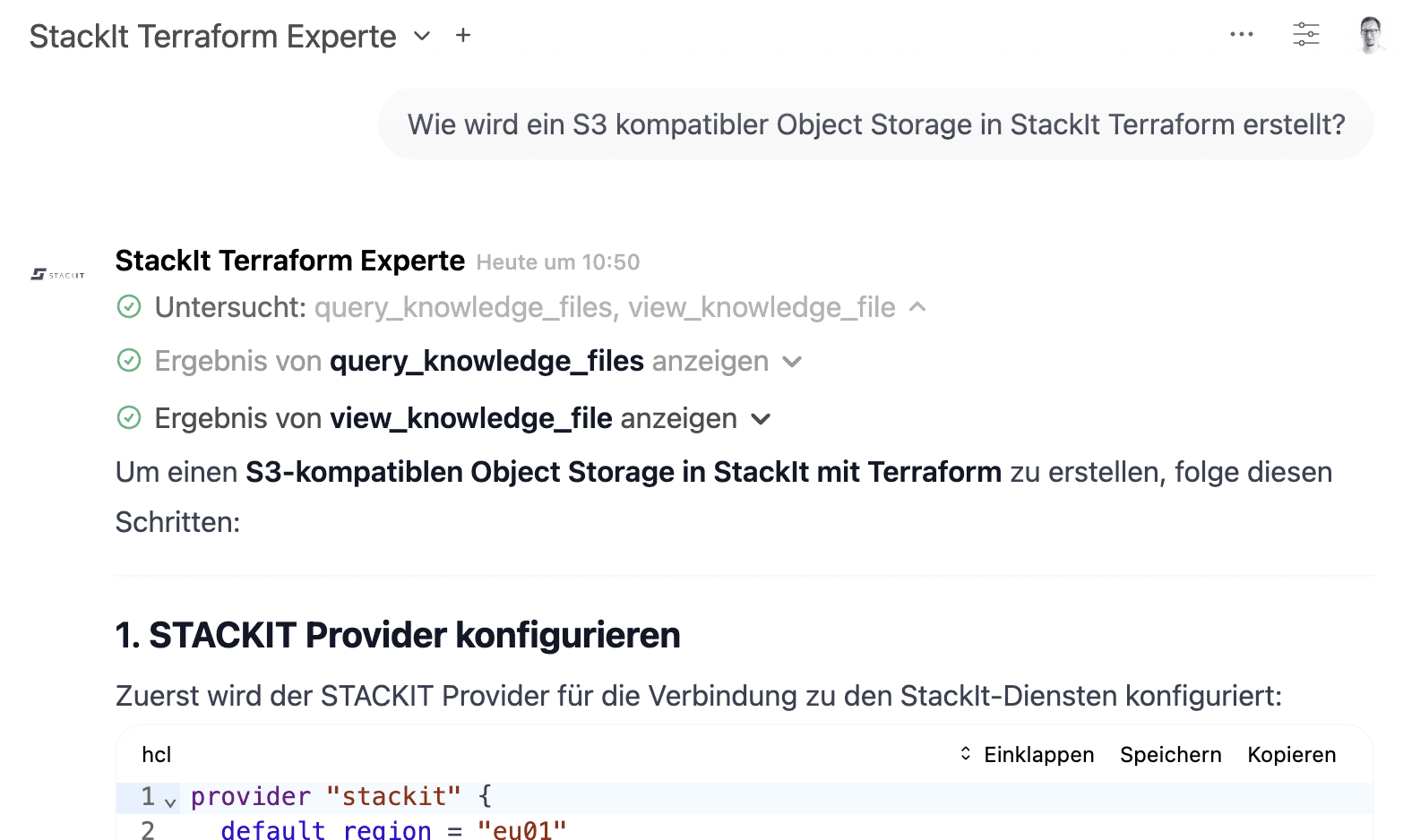
We now test the expert we've just created:
Test run with the newly created expert model
From query_knowledge_files and view_knowledge_files, you can see that OpenWebUI uses the corresponding tools to search the existing knowledge for answers. So we can have a conversation with our expert model based on the knowledge we've provided. On top of that, the individual tool calls can be expanded, so it's immediately clear which parts of the knowledge were drawn on for the answer.
Having reached this point, we've stood up our own AI system that keeps central elements under our own control and connects AI inference via the APIs of various providers. It's definitely worth digging deeper into LiteLLM and OpenWebUI, because the features presented here only scratch the surface of what's possible. OpenWebUI, for instance, allows skills to be collected and shared, and LiteLLM additionally offers the ability to integrate agents and MCP servers – to name just a few.
Conclusion
Yes, we're still the crowd that loves trying out the biggest, fastest, and best. That won't change – and that's a good thing, because it's the only way we know what's really possible right now. But taking a look at open-weights models and open source tools has shown us: we can achieve pretty similar results with open source software and open models. More cheaply. More independently.
In our day-to-day work, a fairly simple system has proven its worth: OpenWebUI for chat and expert models, LiteLLM as a proxy for coding agents and product integrations – and behind it, EU-based providers that at least give us a good feeling about data protection and availability. The big advantage? We can switch providers without our agents or applications noticing a thing. That's not only convenient, it's also enormously reassuring the next time a frontier model becomes unavailable at short notice or new terms show up.
That doesn't mean we're leaving Claude, GPT, and the like behind. Quite the opposite – for many tasks, they're still the first choice. But anyone using AI seriously today shouldn't put all their eggs in one basket. Open models and tools are long past being a gimmick; they're a real, operable alternative – and a great complement to your existing AI setup.
Nicolas Inden
Senior Consultant
Nicolas Inden
Senior Consultant
Nicolas is a Senior Consultant at INNOQ, bridging business and technology. He specializes in privacy-friendly AI integration and sovereign infrastructure, helping organizations run digital solutions independently and sustainably.
Nicolas Inden
Nicolas is a Senior Consultant at INNOQ, bridging business and technology. He specializes in privacy-friendly AI integration and sovereign infrastructure, helping organizations run digital solutions independently and sustainably.
Sovereignty Review
You know your dependencies. We help you assess what they mean.