If you run a static website, you rarely think twice about hosting. GitHub Pages works, costs nothing, and the code is already there anyway. But "works" and "sovereign" are two different things. This recipe shows how to build a stack with statichost.eu plus Codefloe or Codeberg that is just as convenient, but stays in European hands, treats visitor data transparently, and does not depend on a transatlantic legal basis that is currently starting to wobble.
Daniel Westheide
Senior Consultant
Static websites can be run sovereignly without giving up any convenience: European providers for Git hosting and deployment keep the entire stack independent.
What you’ll learn in this article
The problem: GitHub Pages and GitLab Pages tie code hosting and deployment inseparably together, both sit with US providers under US law, and on top of that come opaque server logs and a shaky legal basis.
The idea: Because static websites are portable, you can separate Git hosting from deployment and replace each with a European alternative.
The ingredients: A static site generator like Zola, a European Git host (Codeberg or Codefloe), and statichost.eu for deployment.
The result: A stack as convenient as GitHub Pages, entirely in European hands, sparing with visitor data, and built from components you can swap out independently.
Content
If you run a static website or a blog, you often reach reflexively for GitHub Pages or GitLab Pages. All it takes is a Git repository hosted there, and a git push immediately triggers the site to be rebuilt and deployed. But behind this convenience lies a problem that is easy to overlook: code hosting and website deployment are inseparably coupled, and both sit with US companies under US law.
Microsoft (GitHub) and GitLab Inc. are subject to the US Cloud Act. That means US authorities can, under certain circumstances, access data even if the servers are physically located in Europe. The content of a public static website is the least of the concerns here, since it is freely accessible anyway. But here is what actually sits at GitHub or GitLab and is not public: the source code (for private repositories), unpublished drafts, deployment logs, account and access credentials, and access statistics. For a company blog, that could be, for example, unpublished content, internal structures, or hints about client projects.
GitHub, GitLab, and Cloudflare all have Data Processing Agreements and formally address GDPR compliance. As a website operator, however, you do not know which visitor data, IP addresses, user agents, timestamps, is actually collected. statichost.eu transparently documents what ends up in server logs: no IP addresses, no user agents, only aggregated response sizes for billing, backed up by a real log entry in their documentation. What GitHub, GitLab, or Cloudflare actually log remains unclear. On top of that comes the legal basis: the EU-US Data Privacy Framework, which US providers invoke for data transfers, rests substantially on the independence of the FTC, which the US Supreme Court declared unconstitutional at the end of June 2026. European law on European servers is no small matter right now.
There is also a subtler form of dependency: GitHub Pages is so seamlessly integrated into the GitHub workflow that you barely notice the coupling between code hosting and deployment. This is not a hard lock-in. As this recipe shows, switching is technically straightforward. But if you have never consciously separated the two, you also never think to optimize or replace the components independently of one another.
The good news: static websites are portable by nature. The idea behind this recipe is simple: separate Git hosting and website hosting and replace each with a European alternative. The result is a stack that is just as convenient as GitHub Pages, is entirely in European hands, and where both components can be swapped independently of one another.
Concretely, we show how to port an existing website to Codeberg or Codefloe as the Git host and statichost.eu for deployment.
Ingredients
A static site generator
For this recipe we use Zola, a generator written in Rust that stands out for short build times and needs no external dependencies. But the principle works just as well with any other generator, for example Hugo, Eleventy, or Jekyll. statichost.eu builds the site with a Docker image of your choice. That gives maximum freedom, even for unusual build setups.
A European Git host
Instead of GitHub or GitLab, we recommend two alternatives here, both based on Forgejo, a community fork of Gitea:
Codeberg is a non-profit association based in Berlin. Codeberg is free, fully open source, and its infrastructure is located in Germany. For open-source projects it is an obvious choice. If you host your website's source code publicly, you are clearly within the terms of use. According to the terms of use, private repositories are limited to FLOSS projects and genuinely small personal content such as notes or config files. A website's source code falls into a gray area there. If you want to be on the safe side, host the repository publicly. Codeberg is deliberately not a commercial general-purpose platform.
Codefloe is explicitly aimed at everyone, from solo developers through open-source projects to enterprise teams, and places no restrictions on content. The platform is likewise based on Forgejo, runs a cloud-native infrastructure, and is developed in the open. Private repositories can be used without restrictions, which makes Codefloe the better choice when the source code should not be public or a commercial context applies.
Both are fully compatible with the standard Git protocol. Switching from GitHub essentially just means changing the remote URL, and both offer an import function that takes over the repository history. statichost.eu is also not limited to these two: the service supports in principle any Git host that offers webhooks, including self-hosted Forgejo or other platforms.
statichost.eu
statichost.eu is a European hosting service made specifically for static websites. All you have to do is create a site with a repository behind it and specify how the static site is built. Optionally, as with GitHub Pages and GitLab Pages, you can of course also use a custom domain.
On every push, the site is automatically rebuilt and served. Provider and infrastructure are European.
What ends up in server logs is reduced to the absolute minimum: timestamp, HTTP method, host, response size, and status code, no IP addresses, no user agents. The logs are deleted after seven days at the latest, in practice usually earlier. For organizations, statichost.eu of course provides a Data Processing Agreement.
Preparation
We assume that a static website already exists and is hosted via GitHub Pages. The source code therefore sits in a GitHub repository, and GitHub builds and deploys the site on every push. This is exactly the coupling we now dissolve. All steps work with Codeberg analogously to Codefloe.
Step 1: Migrate the repository to Codefloe
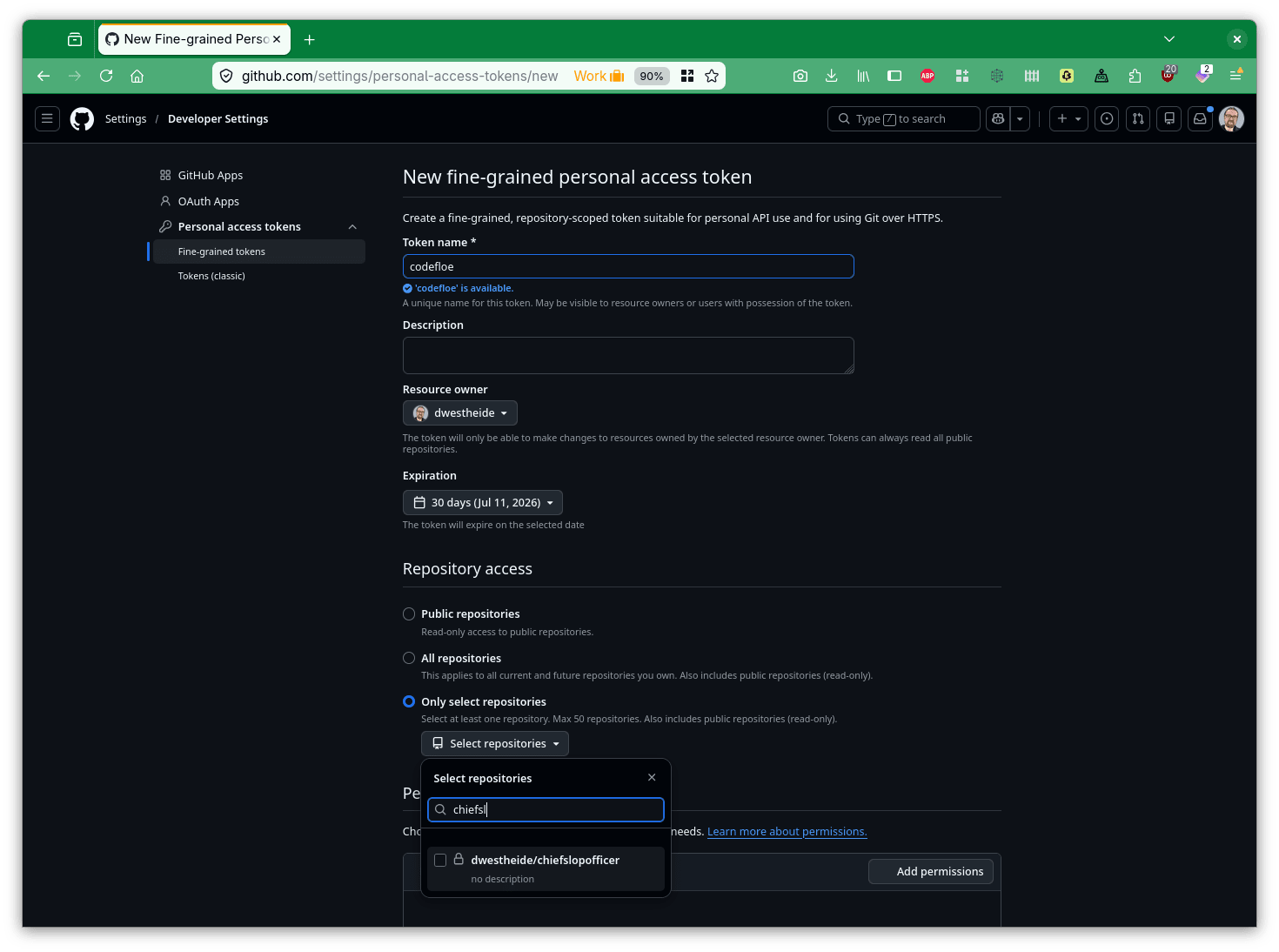
There are two ways to migrate the repository to Codefloe. The first is automatic migration. For this, a Personal Access Token (PAT) first has to be created in GitHub.
Creating a new Personal Access Token in GitHub
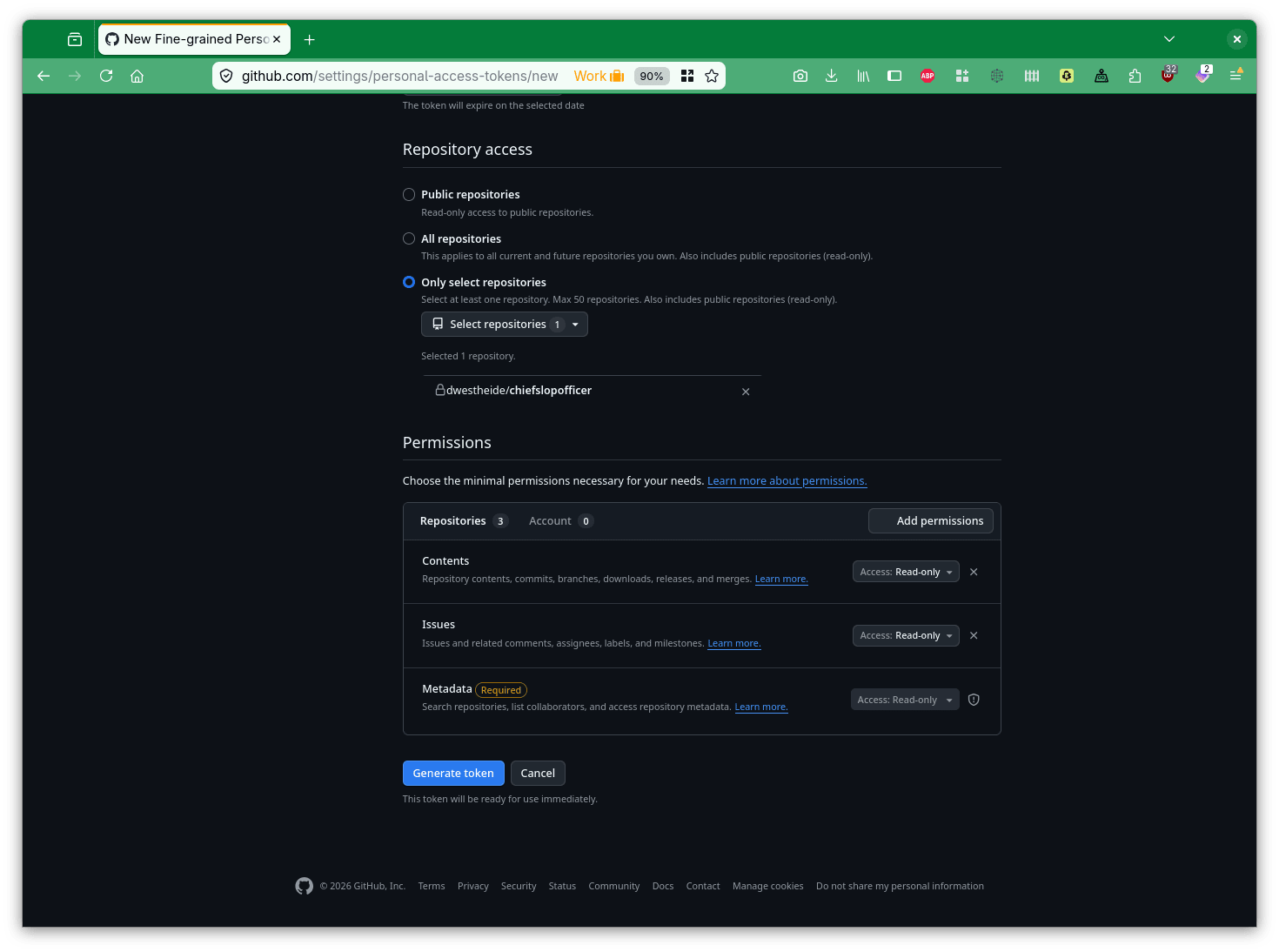
This has to be assigned the necessary permissions to read the content of the existing GitHub repository, as shown in the following screenshot.
Setting the permissions of the GitHub Personal Access Token
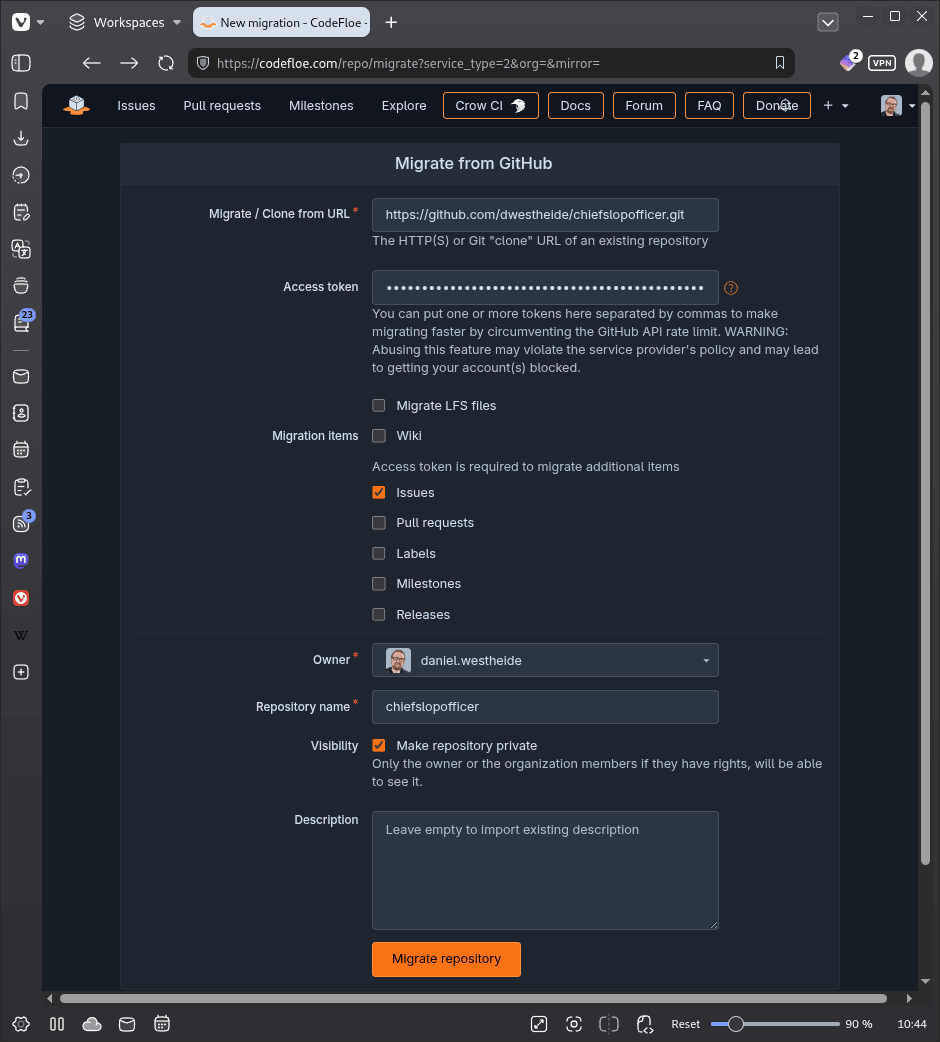
In Codefloe, we then choose the "New migration" option instead of the usual "New Repository".
Now we can enter the URL of the GitHub repository, our access token, and the items we want to migrate. In the example, we decide to import not only the source code and its Git history but also the issues.
Instead of such a migration, you can also simply create a new repository on Codefloe. In our local copy, we then set the origin to the remote URL of the new Codefloe repository and push to it.
git remote set-url origin https://codefloe.com/your-username/my-website.git
git push -u origin main
Step 2: Create a project on statichost.eu
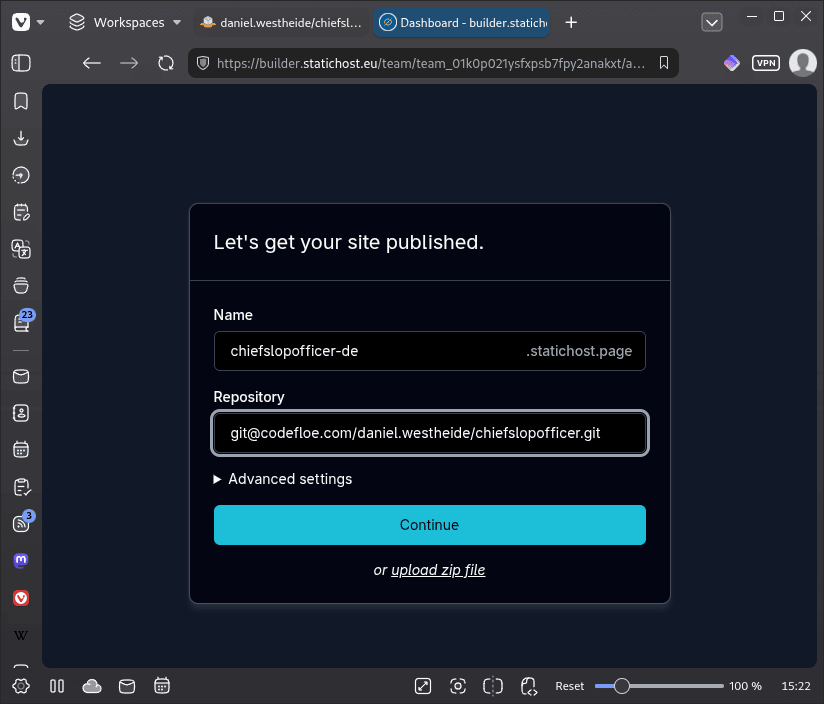
Register at statichost.eu and create a new project. You will be asked for the repository URL. Enter the URL of your Codeberg or Codefloe repository here.
Adding a new site in statichost.eu
Step 3: Build configuration
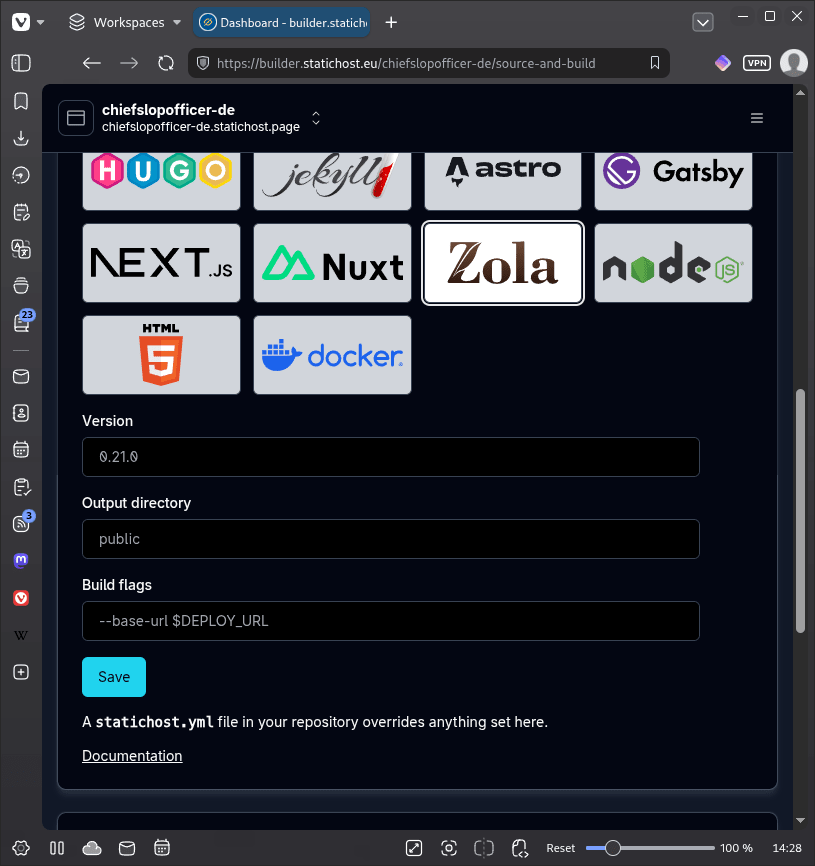
When creating the project, you can select Zola or other common static site generators such as Hugo, Jekyll, or Gatsby. In the case of Zola, you can then set a version, an output directory, and optional build flags. For generators that statichost.eu does not know, you can also select Docker. Then it is possible to set a Docker image, a build command, and the output directory.
As an alternative to the build configuration in the web UI, you can also place a statichost.yml file in the Git repository. For Zola, it looks roughly like this:
image: ghcr.io/getzola/zola:v0.21.0
command: build
public: public
image_entrypoint: true
Step 4: Set up a webhook
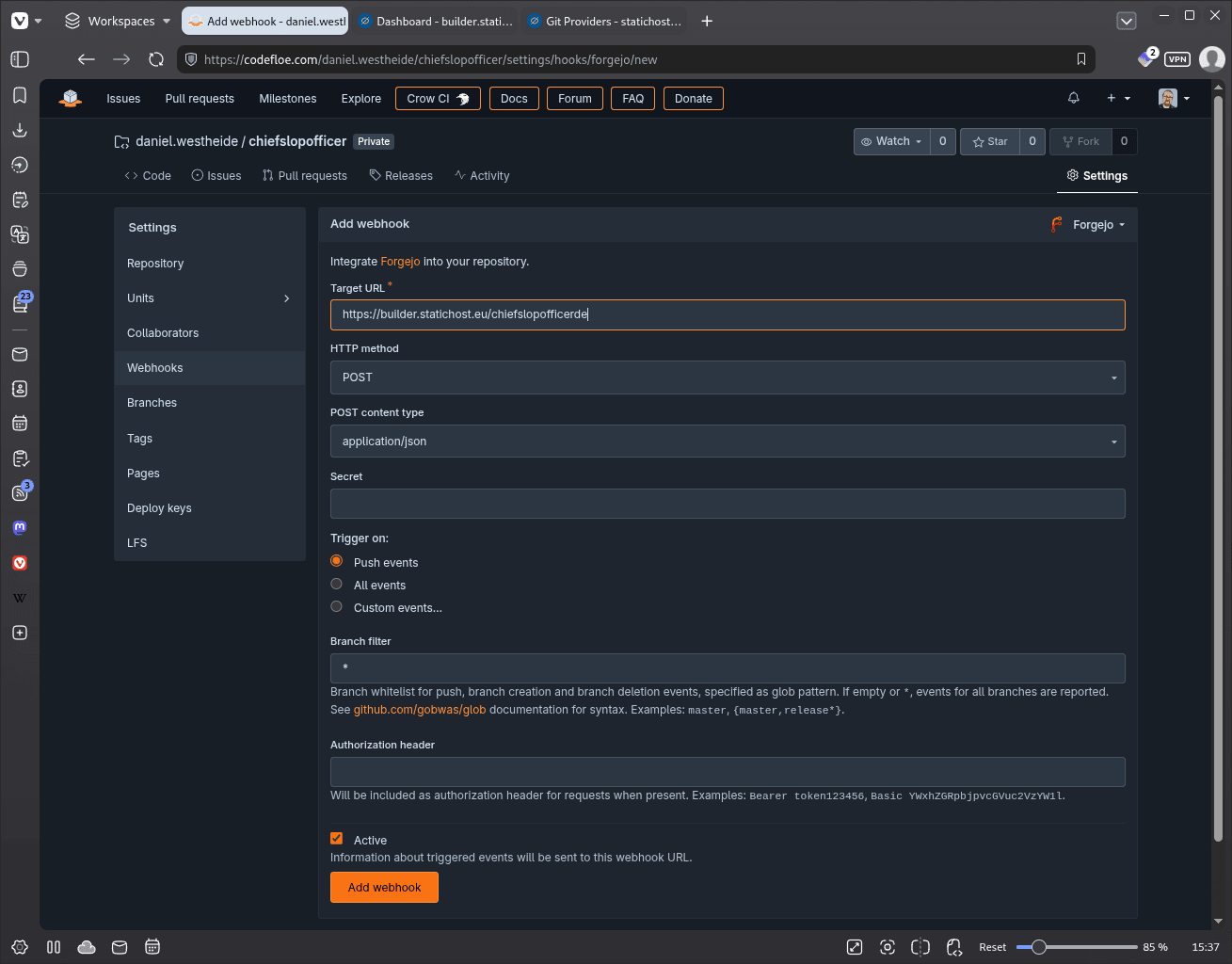
To trigger an automatic build on every push, statichost.eu needs a webhook configured in the repository. After the project is created, statichost.eu shows the matching webhook URL.
In Codefloe, the configuration is found under Repository → Settings → Webhooks → Add webhook. There you enter the webhook URL from statichost.eu and choose "Push Events" as the trigger. In Codeberg, the path is analogous.
After the next git push, statichost.eu automatically builds the site and makes it available under a *.statichost.page subdomain.
Step 5: Set up a custom domain (optional)
statichost.eu supports custom domains including automatic TLS certificates via Let's Encrypt. For this, you set a CNAME record at your DNS provider pointing to the address provided by statichost.eu. The exact values are shown in the project dashboard.
Topping
If you want to host the entire stack yourself, you can use Forgejo Actions or Crow CI (Codefloe's integrated CI system) to trigger a build on every push and transfer the result to your own VPS via rsync, served by nginx, Apache, or Caddy.
To be honest, though, this is not an equivalent replacement: statichost.eu comes with a distributed CDN via Bunny and built-in resilience. On top of that comes consistent data economy, common web servers log IP addresses, user agents, and referrers by default. Reducing that to a privacy-friendly minimum is manual configuration work that is easily forgotten. With statichost.eu, it is implemented that way out of the box.
Conclusion
GitHub Pages and GitLab Pages are convenient, but they couple two things that should really be independent: where code lives and where a website is served. Add to that opaque server logs, Cloudflare as a silent third party, and US law as the legal framework. With statichost.eu and Codeberg or Codefloe, this stack can be replaced entirely with European alternatives, without giving up automatic deployment or convenience, and with a provider that does not phrase data minimization as a promise but implements it technically. The decisive advantage of decoupling: Git hosting and deployment can be chosen and switched independently of one another.
Daniel Westheide
Senior Consultant
Daniel Westheide
Senior Consultant
Daniel Westheide is a senior consultant at INNOQ specializing in software architecture and development practices. His interdisciplinary background combines software engineering with cognitive psychology and human-computer interaction.
Daniel Westheide
Daniel Westheide is a senior consultant at INNOQ specializing in software architecture and development practices. His interdisciplinary background combines software engineering with cognitive psychology and human-computer interaction.
Sovereignty Review
You know your dependencies. We help you assess what they mean.